💳 CardBox
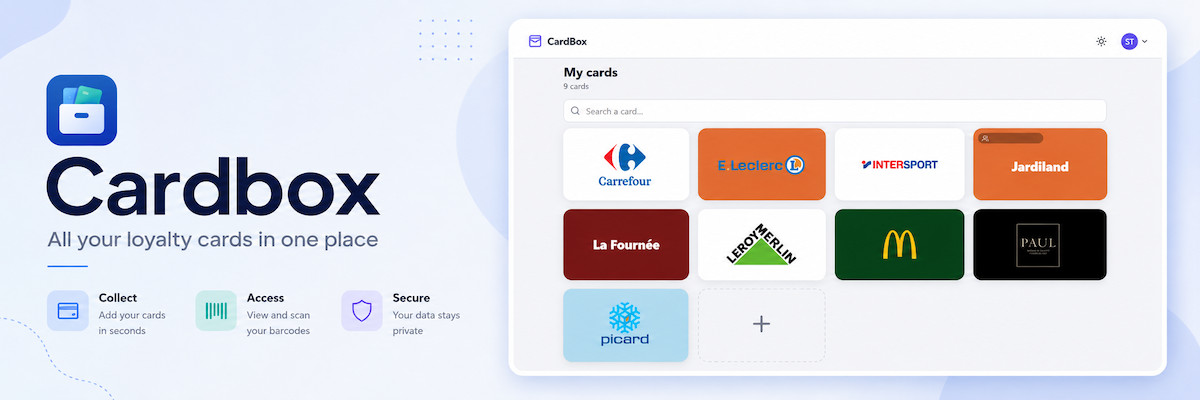




CardBox is a self-hosted wallet for loyalty cards: each card keeps its brand, colour and logo, its barcode and the card code some terminals ask for. Open a card and the barcode fills the phone screen, ready for the till.
Introduction
Accounts are invite-only and every user keeps their own cards; a card can be shared read-only with chosen accounts. Cards are added by hand or by photographing them: the backend reads the barcode out of the picture and suggests the card's colour, the barcode itself is drawn on the phone by the SPA. Built phone-first (370–480 px), comfortable on the desktop, and installable: the wallet stays readable offline.
This page covers installing and running the application as a self-contained web service.
Info
CardBox is open-source and lives in this repository under src/
(Rust backend + React/TypeScript frontend), with the Podman packaging in
build/, quadlet/ and nginx/.
Features
- 💳 Own wallet per user, sharing on purpose: coloured tiles with the brand logo (or name) centred, searchable by brand or notes; a card can be shared read-only with chosen accounts
- ▮▯▮ Barcodes drawn client-side (EAN-13/8, UPC-A/E, Code 128, Code 39, ITF, Codabar, QR) on a white stage, with the number in large digits and the optional card code; a full-screen white till mode and a screen wake lock for the scanner
- 📷 Scan a card: a photo is decoded on the backend (format + value) and the card colour is suggested from the picture
- 🎨 A colour panel (picker + presets), optional rectangular logo — transparent PNG works best — downscaled in the browser, UUID-named file under the data directory
- 📱 Installable PWA: the app shell and the user's cards are cached on the device, so the wallet opens with no network (read-only)
- 🔐 Invite-only accounts with emailed activation links, forgot-password link and optional TOTP 2FA — admins invite, promote and delete users
- 🌗 Light/dark theme per account
How it works
   Web UI (SPA)  ──►  axum API  ──►  PostgreSQL  (cards / users / sessions)
                          │
                          └──►  /data/logos  (card logos — UUID names)
The backend binary serves both the API and the built React SPA. Cards, users and sessions live in PostgreSQL; the card logos are stored as files under the data directory. A photographed card is decoded server-side (pure-Rust ZXing port); the barcodes shown at the till are rendered in the browser from the stored format + value.
📥 Installation
This section describes how to install and run Podman services using systemd Quadlet, enabling containers to restart automatically. It allows the service to run in its own isolated rootless environment with a dedicated Linux user.
📋 Requirements
⚙️ Configuration
📋 Service Setup
Info
Please follow the following installation steps:
Define Service Variables
# define the service name
SERVICE_NAME=cardbox
Initialize Service Environment
# built-in bash safety and SERVICE_NAME validation
set -euo pipefail; [ -n "${SERVICE_NAME:-}" ] || { echo "SERVICE_NAME is empty"; exit 1; }

# automatically generate variables
SERVICE_HOME="/media/ssd/podman-users/${SERVICE_NAME}"
SERVICE_DIR="/media/ssd/podman/${SERVICE_NAME}"
SERVICE_USER="${SERVICE_NAME}_svc"
SERVICE_ADMIN="${SERVICE_NAME}_admins"
🔐 Service Isolation
Configure Rootless Podman UID/GID Namespace Mappings
# allocate rootless Podman UID/GID mappings if missing
SUBID_SIZE=65536
allocate_subids_if_missing() {
  local user="$1"
  local start
  if ! grep -q "^${user}:" /etc/subuid; then
    start="$(awk -F: 'BEGIN { max = 100000 } { end = $2 + $3; if (end > max) max = end } END { print max }' /etc/subuid)"
    sudo usermod --add-subuids "${start}-$((start + SUBID_SIZE - 1))" "$user"
  fi
  if ! grep -q "^${user}:" /etc/subgid; then
    start="$(awk -F: 'BEGIN { max = 100000 } { end = $2 + $3; if (end > max) max = end } END { print max }' /etc/subgid)"
    sudo usermod --add-subgids "${start}-$((start + SUBID_SIZE - 1))" "$user"
  fi
}
allocate_subids_if_missing "${SERVICE_USER}"

# verify rootless Podman UID/GID namespace mappings exist
grep -q "^${SERVICE_USER}:" /etc/subuid || { echo "ERROR: missing subuid mappings for ${SERVICE_USER}"; exit 1; }
grep -q "^${SERVICE_USER}:" /etc/subgid || { echo "ERROR: missing subgid mappings for ${SERVICE_USER}"; exit 1; }

# validate that all subordinate ID ranges in a file are non-overlapping
validate_subid_ranges() {
  local file="$1"
  awk -F: '
    {
      start = $2
      end   = $2 + $3 - 1
      for (i = 1; i <= count; i++) {
        if (start <= ends[i] && end >= starts[i]) {
          printf "ERROR: overlapping ranges in %s\n", FILENAME
          printf "  %s:%s:%s overlaps %s:%s:%s\n",
            $1, $2, $3,
            names[i], starts[i], sizes[i]
          exit 1
        }
      }
      count++
      names[count]  = $1
      starts[count] = start
      ends[count]   = end
      sizes[count]  = $3
    }
  ' "$file"
}
validate_subid_ranges /etc/subuid
validate_subid_ranges /etc/subgid

# configure the rootless storage driver BEFORE Podman first initializes its storage.
# fuse-overlayfs is a reliable rootless overlay backend and avoids kernel-version
# quirks of native rootless overlay on ARM/Armbian. It is optional with the default
# userns used here, but recommended; set it before the first storage init so no
# 'podman system reset' is needed later.
sudo -u "${SERVICE_USER}" mkdir -p "${SERVICE_HOME}/.config/containers"
sudo -u "${SERVICE_USER}" tee "${SERVICE_HOME}/.config/containers/storage.conf" >/dev/null <<'EOF'
[storage]
driver = "overlay"

[storage.options.overlay]
mount_program = "/usr/bin/fuse-overlayfs"
EOF

# rebuild rootless Podman state to ensure existing containers/storage use current namespace mappings
# use a login shell (-i) so HOME points at the service user's home
# (storage now initializes with fuse-overlayfs; no 'podman system reset' needed)
sudo -iu "${SERVICE_USER}" podman system migrate
Configure Secure Service Directory Permissions
# Apply the admin/service ACL policy to one directory tree, deterministically.
#   $1 = tree to treat
#   $2 = (optional) a sub-path to skip entirely (e.g. a container data subtree)
#
# Why setfacl, not chmod: on an ACL'd tree, chmod edits only the mask, never group::,
# so stale execute bits survive. setfacl sets every entry explicitly (mask included),
# lowercase — the result is reproducible and no execute bit can resurface.
apply_acl_tree() {
    local tree="$1"
    local skip="${2:-}"
    local prune=()
    [ -n "$skip" ] && prune=( -path "$skip" -prune -o )                                         # skip this subtree if a 2nd arg is given

    sudo find "$tree" "${prune[@]}" -exec chown "${SERVICE_USER}:${SERVICE_ADMIN}" {} +         # service user owns; admin group is the owning group

    # directories — access ACL (perms on the existing dirs)
    sudo find "$tree" "${prune[@]}" -type d -exec setfacl    -m g:${SERVICE_ADMIN}:rwx {} +     # admin group: access existing dirs
    sudo find "$tree" "${prune[@]}" -type d -exec setfacl    -m u:${SERVICE_USER}:rwx {} +      # service user: access existing dirs
    sudo find "$tree" "${prune[@]}" -type d -exec setfacl    -m u::rwx,g::rwx,o::-,m::rwx {} +  # owner/group rwx, deny others, pin mask rwx

    # directories — default ACL (inherited by NEW files/dirs created later)
    sudo find "$tree" "${prune[@]}" -type d -exec setfacl -d -m g:${SERVICE_ADMIN}:rwx {} +     # admin group: inherit access on new items
    sudo find "$tree" "${prune[@]}" -type d -exec setfacl -d -m u:${SERVICE_USER}:rwx {} +      # service user: inherit access on new items
    sudo find "$tree" "${prune[@]}" -type d -exec setfacl -d -m u::rwx,g::rwx,o::- {} +         # default owner/group/other for new items

    # files — access ACL (rw only, never executable)
    sudo find "$tree" "${prune[@]}" -type f -exec setfacl    -m g:${SERVICE_ADMIN}:rw {} +      # admin group: access existing files
    sudo find "$tree" "${prune[@]}" -type f -exec setfacl    -m u:${SERVICE_USER}:rw {} +       # service user: access existing files
    sudo find "$tree" "${prune[@]}" -type f -exec setfacl    -m u::rw,g::rw,o::-,m::rw {} +     # owner/group rw, deny others, pin mask rw

    sudo find "$tree" "${prune[@]}" -type d -exec chmod g+s {} +                                # setgid: new items inherit the group (a MODE bit; ACLs can't set it)
}

# --- SERVICE_HOME: Podman's private runtime home ------------------------------
# Own the home + set setgid, then ACL ONLY the .config subtree (containers.conf,
# storage.conf, and the *.network / *.container quadlets you hand-edit) so admins
# can edit them sudo-less.
#
# Leave ~/.local (storage) and ~/.cache to Podman: ACLs on the overlay store break
# the runtime ("OCI permission denied" on the `merged` mount). Admin reaches them via sudo.
sudo chown "${SERVICE_USER}:${SERVICE_ADMIN}" "${SERVICE_HOME}"                       # service user owns; admin group is the owning group
sudo chmod u=rwx,g=rwx,o=,g+s "${SERVICE_HOME}"                                       # owner/admin access; deny others; inherit group on new items
apply_acl_tree "${SERVICE_HOME}/.config"                                              # .config subtree: full sudo-less admin ACL treatment

# --- bind-mount data dirs: created + owned BEFORE the SERVICE_DIR ACL pass ---------
# Each container writes as a mapped subuid, so its data dir must be owned by that subuid
# (chown as root; only root crosses the id range). We create + own them FIRST so they
# neither inherit SERVICE_DIR's default ACL (inheritance happens at creation) nor get
# walked by apply_acl_tree (which prunes data/).
#
# No ACLs here: Postgres refuses a group-accessible PGDATA. Admin reaches them via sudo;
# back Postgres up with pg_dumpall, not a raw file copy.
SUBUID_BASE="$(awk -F: -v u="${SERVICE_USER}" '$1==u {print $2}' /etc/subuid)"
SUBGID_BASE="$(awk -F: -v u="${SERVICE_USER}" '$1==u {print $2}' /etc/subgid)"

# data subdir : in-container uid/gid it must be owned by
data_dirs=(
    "postgres-db:70"          # /var/lib/postgresql — postgres user (pinned User=70:70)
    "logos:1000"              # /data/logos         — card logos, UUID names (image USER 1000)
)

mkdir -p "${SERVICE_DIR}/data"                                                        # the data/ parent: plain, no ACL
sudo chown "${SERVICE_USER}:${SERVICE_ADMIN}" "${SERVICE_DIR}/data"                   # owner/admin
sudo chmod 0750 "${SERVICE_DIR}/data"                                                 # children are set individually below
for entry in "${data_dirs[@]}"; do
    sub="${entry%%:*}"                                  # subdir name
    ids="${entry#*:}"                                   # "uid" or "uid:gid"
    uid="${ids%%:*}"                                    # uid
    gid="${ids#*:}"; [ "$gid" = "$ids" ] && gid="$uid"  # gid (defaults to uid)
    dir="${SERVICE_DIR}/data/${sub}"
    sudo mkdir -p "$dir"
    sudo chown -R "$((SUBUID_BASE + uid - 1)):$((SUBGID_BASE + gid - 1))" "$dir"   # map both to host subids
    sudo chmod 0700 "$dir"
done

# --- SERVICE_DIR: application data, env files, configuration -------------------
# Full treatment so the admin group gets sudo-less access AND the service user keeps
# access even on admin-created files. data/ is EXCLUDED: those dirs are owned by the
# containers' subuids and need engine-specific modes (Postgres rejects a group/other-
# accessible PGDATA), so they are handled separately just below.
apply_acl_tree "${SERVICE_DIR}" "${SERVICE_DIR}/data"                                 # treat everything EXCEPT data/
Configure Secure NGINX Static Assets Permissions
# Grant the NGINX worker user (www-data) read-only access to assets subtrees.
#   $1     = service directory → traverse-only (x)
#   $2..$n = assets subtrees served directly by NGINX (configs, icons, favicon, manifest, ...)
apply_acl_nginx() {
    local tree="$1"; shift
    local assets

    sudo setfacl -m u:www-data:x "$tree"                                        # traverse only: pass through, no listing, no reading

    for assets in "$@"; do
        # assets directories — enter + list, existing and future
        sudo find "$assets" -type d -exec setfacl    -m u:www-data:rx {} +      # www-data: read existing dirs
        sudo find "$assets" -type d -exec setfacl -d -m u:www-data:rx {} +      # www-data: inherit read on new items

        # assets files — www-data read-only, owner/admin rw, never executable.
        # Entries AND mask are pinned explicitly: a bare `setfacl -m u:www-data:r`
        # would recalculate the mask to the union of all entries, resurfacing the
        # latent rwx inherited from the default ACL (files would show group rwx).
        sudo find "$assets" -type f -exec setfacl \
          -m u:www-data:r,u:${SERVICE_USER}:rw,g:${SERVICE_ADMIN}:rw,u::rw,g::rw,o::-,m::rw {} +
    done
}

# --- SERVICE_DIR/nginx: served directly by NGINX -----------
# Created AFTER the apply_acl_tree pass so they inherit the default ACL + setgid
# group (service user/admin keep full access); www-data is then layered on top
# as a read-only named entry.
sudo mkdir -p "${SERVICE_DIR}/nginx"
sudo chown "${SERVICE_USER}:${SERVICE_ADMIN}" "${SERVICE_DIR}/nginx"
apply_acl_nginx "${SERVICE_DIR}" "${SERVICE_DIR}/nginx"
🛡️ Rootless Podman Defaults
Configure rootless Podman per-user configuration directory
# configure rootless Podman defaults for this service user
# - store per-user Podman configuration under ~/.config/containers
sudo -u "${SERVICE_USER}" mkdir -p "${SERVICE_HOME}/.config/containers/systemd"
Configure rootless Podman defaults
# configure rootless Podman defaults for this service user
# - use k8s-file logging for easier log rotation and inspection
sudo -u "${SERVICE_USER}" tee "${SERVICE_HOME}/.config/containers/containers.conf" >/dev/null <<EOF
[containers]
log_driver = "k8s-file"

[engine]
healthcheck_events=false
EOF
🔧 Service Configuration
Setup CardBox Parameters
Before deploying, you need to define a few environment variables that will be used throughout the setup process.
BASE_URL: public URL where the web service is accessibleHOST_PORT: external port used by NGINX to route traffic to the serviceADMIN_EMAIL: the default admin account (email only — there is no admin password in the env)- SMTP settings: required so the admin and invited users receive their activation links (startup aborts if the relay is unreachable)
###################################################################################
# NGINX Proxy Configuration
###################################################################################
HOST_PORT=10075
###################################################################################
# Postgres Configuration
###################################################################################
PG_VERSION=18-alpine
PG_DB=cardbox
PG_USER=cardbox
PG_PASSWORD="$(openssl rand -hex 32)"
###################################################################################
# CardBox Configuration
###################################################################################
BASE_URL=https://cardbox.domain.fr
ADMIN_EMAIL=admin@domain.fr
###################################################################################
# SMTP Configuration
###################################################################################
SMTP_HOST=smtp.gmail.com
SMTP_PORT=587
SMTP_SECURITY=starttls
SMTP_USER=cardbox@domain.fr
SMTP_PASSWORD=your-smtp-password
SMTP_FROM=cardbox@domain.fr
Getting Your Gmail SMTP Password
To send emails via Gmail SMTP, you'll need to generate an App Password.
A special password used for third-party applications.
Visit myaccount.google.com/apppasswords to create one.
Use the generated password in the SMTP_PASSWORD field of your configuration.
Create the Environment file
sudo -u "${SERVICE_USER}" tee "${SERVICE_DIR}/postgres.env" >/dev/null <<EOF
###################################################################################
# Postgres Database Configuration
###################################################################################
POSTGRES_VERSION=${PG_VERSION}
POSTGRES_DB=${PG_DB}
POSTGRES_USER=${PG_USER}
POSTGRES_PASSWORD=${PG_PASSWORD}
EOF
sudo -u "${SERVICE_USER}" tee "${SERVICE_DIR}/cardbox.env" >/dev/null <<EOF
###################################################################################
# NGINX Proxy Configuration
###################################################################################
HOST_PORT=${HOST_PORT}

###################################################################################
# Build Version
###################################################################################
GIT_COMMIT=

###################################################################################
# CardBox Configuration
###################################################################################
CARDBOX_BASE_URL=${BASE_URL}
CARDBOX_COOKIE_SECURE=true

###################################################################################
# Default admin (seeded 'pending' on first start)
###################################################################################
CARDBOX_ADMIN_EMAIL=${ADMIN_EMAIL}

###################################################################################
# SMTP (required for new-user validation emails)
###################################################################################
SMTP_HOST=${SMTP_HOST}
SMTP_PORT=${SMTP_PORT}
SMTP_SECURITY=${SMTP_SECURITY}
SMTP_USER=${SMTP_USER}
SMTP_PASSWORD=${SMTP_PASSWORD}
SMTP_FROM=${SMTP_FROM}
EOF
Keep the .env files
All the secret informations will be stored in the .env files.
Optional tunables (defaults shown in
cardbox.prod.env.example):CARDBOX_SESSION_TTL_HOURS=720,CARDBOX_ACTIVATION_TTL_HOURS=72,CARDBOX_MAX_UPLOAD_MB=10,CARDBOX_TRUSTED_PROXIES=127.0.0.1,::1.
🧩 Quadlet Service
Enable and Start Quadlet Services
# open an interactive shell as the service user
sudo -iu "${SERVICE_USER}"

# reload systemd user units
systemctl --user daemon-reload

# build the cardbox image (first install; podmanctl --update rebuilds afterwards)
systemctl --user start cardbox-build.service

# start Podman Quadlet services
systemctl --user start cardbox-server.service

# verify service status
systemctl --user status cardbox-server.service
To follow the service logs in real time, run
sudo journalctl _UID=$(id -u ${SERVICE_USER}) -ffrom the Debian account.
🚀 Deploy CardBox
Install NGINX
NGINX needs to be installed, follow the NGINX section.
Configure NGINX
NGINX needs to be configured using a file in /etc/nginx/sites-enabled directory.
This configuration file specify the documentation path:
# Per-client rate-limit bucket for the auth endpoints (login is Argon2-costly;
# activate consumes single-use tokens). Must live in http{} context, so it sits
# outside the server{} block.
#
# Every zone below keys on $limit_key, the shared key from nginx.conf: the address
# for IPv4, the /64 prefix for IPv6 — keying on a full IPv6 address would let one
# subscriber prefix mint 2^64 empty buckets and bypass the limits entirely.
limit_req_zone $limit_key zone=cardbox_auth:10m rate=10r/m;

# Per-client bucket for the picture routes (logo upload, photo scan). Each scan
# decodes a photo on a blocking thread and each logo write hits the disk, so
# this bounds the arrival rate a single source can impose.
#
# Only the writing methods are counted: the wallet fetches every card's logo
# back to back when it opens, far past burst=20 at this zone's 1r/s refill,
# so the logo GETs must pass freely. limit_req skips a request whose key is
# empty, which exempts GET/HEAD while PUT/POST/DELETE keep the brake.
map $request_method $cardbox_upload_key {
  default $limit_key;
  GET     "";
  HEAD    "";
}
limit_req_zone $cardbox_upload_key zone=cardbox_uploads:10m rate=60r/m;

# The app container, published on the loopback by its Quadlet unit. It sits
# behind an upstream block for one reason: `keepalive`. Without it nginx opens —
# and immediately closes — a brand-new TCP connection for EVERY proxied request,
# and on this host each of those crosses rootless Podman's userspace port
# forwarder. Opening the wallet fetches every card's logo back to back on
# top of the SPA assets, so a single page load paid a handshake per card
# through that forwarder.
# `proxy_http_version 1.1` (already set in every location) and
# `proxy_set_header Connection ""` are what let a connection go back into this
# pool instead of being torn down.
upstream cardbox_app {
  server 127.0.0.1:10075;
  keepalive 32;
  keepalive_requests 1000;
  keepalive_timeout 60s;
}

server {
  server_name cardbox.domain.fr;

  # Security headers; `always` also covers the NGINX-served error pages. No
  # Content-Security-Policy here: the app serves its own on every response
  # (src/backend/src/web.rs) with the allowances its features need (the
  # inline pre-paint theme script hash, data:/blob: images for the MFA QR
  # code and picture previews). Browsers enforce EVERY CSP header they
  # receive, so a second, stricter proxy policy would silently break those
  # features — keep the app's CSP the single source of truth.
  add_header Strict-Transport-Security "max-age=63072000; includeSubDomains" always;
  add_header X-Content-Type-Options "nosniff" always;
  add_header X-Frame-Options "DENY" always;
  add_header Referrer-Policy "strict-origin-when-cross-origin" always;

  # setup 404 error_page
  error_page 404 /404.html;
  include snippets/error-404.conf;

  # show maintenance page when backend is down
  error_page 502 503 504 /maintenance.html;
  include snippets/error-maintenance.conf;

  # The backend answers unknown /api/* paths with a JSON 404 and every other path
  # with the SPA (200), so the only 404 that ever reaches us from upstream is an
  # API error. proxy_intercept_errors is on globally, which would swap that JSON
  # body for the HTML page and leave the UI parsing markup as JSON. NGINX's own
  # errors are unaffected — an unreachable container still gets the maintenance
  # page, because NGINX generates that 502 itself rather than proxying it.
  proxy_intercept_errors off;

  # Default ceiling for the whole vhost. Everything except the picture routes
  # posts JSON, so 1 MB is generous — and it matters that this is the default:
  # nginx buffers a request body to disk BEFORE opening the upstream connection,
  # so a server-wide 12m would let an unauthenticated client spool 12 MB to
  # client_body_temp against any path and churn the proxy host's disk long before
  # the app returns 401. The picture routes raise it for themselves below.
  client_max_body_size 1m;

  # Every unauthenticated auth endpoint, rate-limited before hitting the app.
  # `activation/<token>` is included and is why the pattern has no trailing `$` —
  # it carries the token in the path and runs a DB query per call. The app also
  # keeps a per-IP activation lockout; this is the layer in front of it.
  # A route left out of this list is a route with no limit at all: the zone only
  # applies where a location names it.
  # Regex location (takes precedence over `location /`), so it repeats the proxy
  # setup; rejections give 429.
  # Keep the port in sync with HOST_PORT in cardbox.env.
  location ~ ^/api/auth/(login|activate|forgot-password|activation/) {
    limit_req zone=cardbox_auth burst=5 nodelay;
    limit_req_status 429;

    proxy_pass http://cardbox_app;
    proxy_http_version 1.1;
    include proxy_params;
    # Empty Connection header: keeps the pooled upstream connection alive.
    proxy_set_header Connection "";
    proxy_set_header X-Forwarded-For $remote_addr;
    proxy_set_header X-Forwarded-Host $host;
    proxy_set_header X-Forwarded-Port $server_port;
    proxy_redirect off;
  }

  # Picture routes: the card logo (PUT/GET/DELETE) and the photo scan (POST) —
  # writes are rate-limited per source IP, logo reads pass freely (see the
  # zone's map above). Regex location, so it repeats the proxy setup.
  location ~ ^/api/cards/(scan|[^/]+/logo)$ {
    limit_req zone=cardbox_uploads burst=20 nodelay;
    limit_req_status 429;

    # Keep above the app's own cap (CARDBOX_MAX_UPLOAD_MB, default 10 MB), and
    # stream the body to the app instead of spooling it to the proxy's disk.
    client_max_body_size 12m;
    proxy_request_buffering off;

    proxy_pass http://cardbox_app;
    proxy_http_version 1.1;
    include proxy_params;
    # Empty Connection header: keeps the pooled upstream connection alive.
    proxy_set_header Connection "";
    proxy_set_header X-Forwarded-For $remote_addr;
    proxy_set_header X-Forwarded-Host $host;
    proxy_set_header X-Forwarded-Port $server_port;
    proxy_redirect off;
  }

  # Liveness probe — public (the local launcher probes it), but every hit runs
  # a DB query against a 5-connection pool, so it is rate-limited: a flood would
  # otherwise saturate the pool and stall real requests (and the container
  # healthcheck probes the same route, with HealthOnFailure=kill).
  location = /api/health {
    limit_req zone=cardbox_auth burst=10 nodelay;
    limit_req_status 429;

    proxy_pass http://cardbox_app;
    proxy_http_version 1.1;
    include proxy_params;
    # Empty Connection header: keeps the pooled upstream connection alive.
    proxy_set_header Connection "";
    proxy_set_header X-Forwarded-For $remote_addr;
    proxy_set_header X-Forwarded-Host $host;
    proxy_set_header X-Forwarded-Port $server_port;
    proxy_redirect off;
  }

  # reverse proxy
  location / {
    proxy_pass http://cardbox_app;

    # keep it HTTP/1.1
    proxy_http_version 1.1;

    # forwarded headers. proxy_params APPENDS to the client's own
    # X-Forwarded-For, so a caller can prepend whatever hops it likes; NGINX is
    # the edge here and there is no upstream chain worth keeping, so overwrite
    # it with the real peer and the app can never be handed a forged hop.
    include proxy_params;
    # Empty Connection header: keeps the pooled upstream connection alive.
    proxy_set_header Connection "";
    proxy_set_header X-Forwarded-For $remote_addr;
    proxy_set_header X-Forwarded-Host $host;
    proxy_set_header X-Forwarded-Port $server_port;
    proxy_redirect off;
  }
}
# restart nginx
sudo nginx -t && sudo service nginx restart
Replace
cardbox.domain.frby the name of your website, and10075byHOST_PORT.
Activate HTTPS
To activate HTTPS protocol, follow the Let's Encrypt section.
First login — activate the admin account
The admin account is created pending on first start (from CARDBOX_ADMIN_EMAIL).
There is no admin password in cardbox.env. To activate it:
- On first start, the server e-mails an activation link to
CARDBOX_ADMIN_EMAIL(SMTP must be reachable — startup aborts otherwise). - Open the activation link from the e-mail, choose a password, and you are signed in.
- The link is single-use and expires after
CARDBOX_ACTIVATION_TTL_HOURS(72 h by default).
Accounts are invite-only — there is no self-registration. The admin invites further users the same way (activation link by e-mail); each user keeps their own cards (and may share one read-only with other accounts), and optional TOTP 2FA can be enabled from the profile page.
⬆️ Updating CardBox
CardBox deploys on push. The bare repo's post-receive hook calls the deploy
wrapper, which stamps the pushed commit into cardbox.env, acknowledges the push
right away, and then runs podmanctl --update cardbox (stop → git pull → rebuild →
restart) detached in the background. The rebuild is incremental: --update never
re-pulls base images, so the cargo-chef dependency layers stay cached and a routine push
recompiles only the app crate (+ the SPA if it changed) — a few minutes. It can still
stretch to 10 min+ (first build, dependency changes, right after an --upgrade) — far
longer than the HTTP push stays open — so the heavy work is handed to a worker that
outlives the push, and git push returns in seconds with a short status. podmanctl no
longer stamps GIT_COMMIT itself — the wrapper owns that, so the deployed version matches
the pushed commit. Base-image refreshes are a separate, deliberate step — see
Upgrading the base images below.
A flock in the worker serialises deploys: if you push again while a build is still
running, the second deploy waits for the first to finish, then redeploys whatever master
points at by then — concurrent git pull / image builds can never overlap, and the server
always converges on the latest pushed commit. Follow a running deploy with
sudo tail -f /var/log/cardbox-deploy.log.
One-time setup — deploy wrapper, hook and sudoers
# the deploy wrapper bakes in the instantiated service dir — guard it exists first
[ -d "${SERVICE_DIR}" ] || { echo "missing ${SERVICE_DIR}"; exit 1; }

# (a) the wrapper — fast + synchronous: stamp the commit, ack the push, detach the build.
# ${SERVICE_DIR}/${SERVICE_NAME} expand now; the rest stays literal (\$…).
sudo tee /usr/local/bin/cardbox-deploy >/dev/null <<EOF
#!/bin/sh
set -eu
ENV_FILE=${SERVICE_DIR}/cardbox.env
LOG=/var/log/${SERVICE_NAME}-deploy.log

commit=\${1:-}
case "\$commit" in ''|*[!0-9a-f]*) echo "usage: cardbox-deploy <short-sha>" >&2; exit 2 ;; esac
[ -f "\$ENV_FILE" ] && grep -q '^GIT_COMMIT=' "\$ENV_FILE" || { echo "cardbox-deploy: no GIT_COMMIT= in \$ENV_FILE" >&2; exit 1; }

# fast + synchronous: stamp the commit and stream a short ack back over the push
sed -i "s/^GIT_COMMIT=.*/GIT_COMMIT=\$commit/" "\$ENV_FILE"
echo "cardbox: GIT_COMMIT -> \$commit"
echo "cardbox: starting 'podmanctl --update ${SERVICE_NAME}' in the background (~10 min)"

# slow + detached: a 10 min rebuild must NOT hold the HTTP push open (it trips the
# git/proxy timeout). Hand it to the worker in a NEW session with its std fds off
# the push connection, so 'git push' returns now.
setsid /usr/local/bin/${SERVICE_NAME}-deploy-run "\$commit" </dev/null >>"\$LOG" 2>&1 &

echo "cardbox: push accepted - deploy running in background"
echo "cardbox: follow it with ->  sudo tail -f \$LOG"
EOF
sudo chmod 0755 /usr/local/bin/cardbox-deploy

# (b) the worker — slow + detached: serialise deploys with flock, then rebuild.
sudo tee /usr/local/bin/${SERVICE_NAME}-deploy-run >/dev/null <<EOF
#!/bin/sh
set -eu
LOCK=/run/lock/${SERVICE_NAME}-deploy.lock
SERVICE_NAME=${SERVICE_NAME}
SERVICE_DIR=${SERVICE_DIR}
SERVICE_USER=${SERVICE_USER}
SERVICE_ADMIN=${SERVICE_ADMIN}

commit=\${1:-unknown}

# serialise deploys: fd 9 holds an exclusive lock for the whole worker. A second
# push that lands mid-build BLOCKS at flock, then runs once we finish — so it is
# never dropped; it redeploys whatever master points at by then.
exec 9>"\$LOCK"
echo "[\$(date -Is)] queued:  \$commit"
flock 9
echo "[\$(date -Is)] running: podmanctl --update \$SERVICE_NAME (commit \$commit)"
podmanctl --update "\$SERVICE_NAME"

# Safety net only: podmanctl re-owns the tree itself, between the pull and
# the builds — ownership MUST NOT change after a build, since Podman keys a
# COPY layer on the copied files' tar headers (uid/gid included), so a
# post-build chown makes identical sources hash differently next time and
# the following deploy recompiles for nothing. This catches anything a
# root-run step outside podmanctl dropped in. data/ is skipped: those trees
# belong to the containers' mapped subuids.
find "\$SERVICE_DIR" -path "\$SERVICE_DIR/data" -prune -o -user root -exec chown "\$SERVICE_USER:\$SERVICE_ADMIN" {} +
echo "[\$(date -Is)] done:    \$commit"
EOF
sudo chmod 0755 /usr/local/bin/${SERVICE_NAME}-deploy-run
The hook's
sudoruns the wrapper as root: it stampsGIT_COMMIT(the hex-only check keeps the wildcard sudoers rule safe — nosedinjection), prints a short ack that streams back over the push, thensetsid-detaches the worker so the long rebuild outlives the HTTP connection. The worker'sflockserialises deploys; its output (pluspodmanctl's) lands in/var/log/cardbox-deploy.log. No extra sudoers entry is needed — the wrapper is already root when it launches the worker. The trailingfind/chownis a safety net:podmanctl --updatealready normalizes ownership between the pull and the builds, which is the order that matters — re-owning files after a build changes their tar headers, and Podman's cache keysCOPYlayers on those, so the next deploy recompiles untouched code. The net still catches anything a root-run step outside podmanctl leaves behind (data/excluded — ownership can't be inherited: only the setgid group and default ACLs propagate).
# install into the bare repo's hooks/ — fires on every push
sudo tee /media/ssd/git/podman/cardbox.git/hooks/post-receive >/dev/null <<'EOF'
#!/bin/sh
set -eu
DEPLOY_BRANCH=refs/heads/master
while read -r oldrev newrev refname; do
  [ "$refname" = "$DEPLOY_BRANCH" ] || continue          # only the deploy branch
  sudo /usr/local/bin/cardbox-deploy "$(git rev-parse --short "$newrev")" </dev/null
done
EOF
# normalize the hook ownership
sudo chown www-data:debian /media/ssd/git/podman/cardbox.git/hooks/post-receive
sudo chmod 0750            /media/ssd/git/podman/cardbox.git/hooks/post-receive

# git seeded hooks/ with executable *.sample files — inert, but strip the bit
sudo chmod -x /media/ssd/git/podman/cardbox.git/hooks/*.sample
The commit comes from the just-pushed ref (the bare repo already holds it), so it is stamped before the instantiated repo pulls — the env always matches the code the restart runs.
# let the git/web user run ONLY the deploy wrapper as root, no password
sudo tee /etc/sudoers.d/cardbox-deploy >/dev/null <<'EOF'
www-data ALL=(root) NOPASSWD: /usr/local/bin/cardbox-deploy *
EOF
sudo chmod 0440 /etc/sudoers.d/cardbox-deploy
sudo visudo -cf /etc/sudoers.d/cardbox-deploy
www-datais the user your HTTPS git backend runs the hook as — replace it if yours differs (e.g. if you push over SSH asdebian).
# deploys pull non-interactively as root: pull from the co-located bare repo over a
# LOCAL path (the HTTPS origin needs a credential prompt + TTY, which a hook lacks)
git -C ${SERVICE_DIR} remote set-url origin /media/ssd/git/podman/cardbox.git

# trust both repos for root so the root-run `git pull` doesn't refuse with
# "detected dubious ownership"; --system applies whatever HOME the hook runs with
sudo git config --system --add safe.directory ${SERVICE_DIR}
sudo git config --system --add safe.directory /media/ssd/git/podman/cardbox.git
Without the local origin the pull dies with could not read Username for 'https://…'; without
safe.directoryit dies with detected dubious ownership. Either waypodmanctl --updateaborts and leaves the service stopped.
Deploy a new version
# from your working clone — the push triggers the whole deploy
git push origin master
The push returns in seconds with a short status (
GIT_COMMIT -> …, deploy started); the stop → git pull → rebuild → restart then runs detached in the background. Watch it withsudo tail -f /var/log/cardbox-deploy.log; the service serves the newGIT_COMMITonce the restart completes.A manual
podmanctl --update cardboxstill works but no longer refreshesGIT_COMMIT— runsudo cardbox-deploy <short-sha>(or just push) to update it.
🧱 Upgrading the base images
Routine deploys never re-pull the images the build starts FROM (rust:1-slim,
node:24-alpine, debian:trixie-slim) nor the registry images the stack runs
(postgres:${POSTGRES_VERSION}) — that is what keeps the layer cache valid and pushes
fast. Refreshing them is a deliberate step:
podmanctl --list --check       # UPDATE column shows when an upstream image moved
podmanctl --upgrade cardbox   # pull bases + registry images, then rebuild + restart
A moved
rust:1-sliminvalidates the whole Rust layer chain — toolchain, cargo-chef, every dependency crate — so an upgrade rebuild runs 15 min+ on the ARM host: schedule it, don't treat it as a routine deploy.--upgradealso re-pullspostgres:${POSTGRES_VERSION}(engine patch releases within the pinned tag). To change a pinned version (e.g.POSTGRES_VERSIONinpostgres.env, or aFROMtag inbuild/Dockerfile), edit/push it first, then run--upgrade. After the upgrade, re-stamp the deployed version if needed:sudo cardbox-deploy <short-sha>.