📸 Installing Immich

Immich is an open-source high performance self-hosted photo and video backup solution. The backend is divided into several services, which are run as individual docker containers:
immich-server: handle and respond to REST API requestsimmich-postgres: persistent data storageimmich-redis: queue management for immich-microservices
Info
The project is open-source and can be downloaded here: https://github.com/immich-app/immich.
The immich-machine-learning docker won't be installed.
📥 Installation
This section describes how to install and run Podman services using systemd Quadlet, enabling containers to restart automatically. It allows the service to run in its own isolated rootless environment with a dedicated Linux user.
📋 Requirements
⚙️ Configuration
📋 Service Setup
Info
Please follow the following installation steps:
Define Service Variables
# define the service name
SERVICE_NAME=immich
Initialize Service Environment
# built-in bash safety and SERVICE_NAME validation
set -euo pipefail; [ -n "${SERVICE_NAME:-}" ] || { echo "SERVICE_NAME is empty"; exit 1; }

# automatically generate variables
SERVICE_HOME="/media/ssd/podman-users/${SERVICE_NAME}"
SERVICE_DIR="/media/ssd/podman/${SERVICE_NAME}"
SERVICE_USER="${SERVICE_NAME}_svc"
SERVICE_ADMIN="${SERVICE_NAME}_admins"
🔐 Service Isolation
Configure Rootless Podman UID/GID Namespace Mappings
# allocate rootless Podman UID/GID mappings if missing
SUBID_SIZE=65536
allocate_subids_if_missing() {
  local user="$1"
  local start
  if ! grep -q "^${user}:" /etc/subuid; then
    start="$(awk -F: 'BEGIN { max = 100000 } { end = $2 + $3; if (end > max) max = end } END { print max }' /etc/subuid)"
    sudo usermod --add-subuids "${start}-$((start + SUBID_SIZE - 1))" "$user"
  fi
  if ! grep -q "^${user}:" /etc/subgid; then
    start="$(awk -F: 'BEGIN { max = 100000 } { end = $2 + $3; if (end > max) max = end } END { print max }' /etc/subgid)"
    sudo usermod --add-subgids "${start}-$((start + SUBID_SIZE - 1))" "$user"
  fi
}
allocate_subids_if_missing "${SERVICE_USER}"

# verify rootless Podman UID/GID namespace mappings exist
grep -q "^${SERVICE_USER}:" /etc/subuid || { echo "ERROR: missing subuid mappings for ${SERVICE_USER}"; exit 1; }
grep -q "^${SERVICE_USER}:" /etc/subgid || { echo "ERROR: missing subgid mappings for ${SERVICE_USER}"; exit 1; }

# validate that all subordinate ID ranges in a file are non-overlapping
validate_subid_ranges() {
  local file="$1"
  awk -F: '
    {
      start = $2
      end   = $2 + $3 - 1
      for (i = 1; i <= count; i++) {
        if (start <= ends[i] && end >= starts[i]) {
          printf "ERROR: overlapping ranges in %s\n", FILENAME
          printf "  %s:%s:%s overlaps %s:%s:%s\n",
            $1, $2, $3,
            names[i], starts[i], sizes[i]
          exit 1
        }
      }
      count++
      names[count]  = $1
      starts[count] = start
      ends[count]   = end
      sizes[count]  = $3
    }
  ' "$file"
}
validate_subid_ranges /etc/subuid
validate_subid_ranges /etc/subgid

# configure the rootless storage driver BEFORE Podman first initializes its storage.
# fuse-overlayfs is a reliable rootless overlay backend and avoids kernel-version
# quirks of native rootless overlay on ARM/Armbian. It is optional with the default
# userns used here, but recommended; set it before the first storage init so no
# 'podman system reset' is needed later.
sudo -u "${SERVICE_USER}" mkdir -p "${SERVICE_HOME}/.config/containers"
sudo -u "${SERVICE_USER}" tee "${SERVICE_HOME}/.config/containers/storage.conf" >/dev/null <<'EOF'
[storage]
driver = "overlay"

[storage.options.overlay]
mount_program = "/usr/bin/fuse-overlayfs"
EOF

# rebuild rootless Podman state to ensure existing containers/storage use current namespace mappings
# use a login shell (-i) so HOME points at the service user's home
# (storage now initializes with fuse-overlayfs; no 'podman system reset' needed)
sudo -iu "${SERVICE_USER}" podman system migrate
Configure Secure Service Directory Permissions
# Apply the admin/service ACL policy to one directory tree, deterministically.
#   $1 = tree to treat
#   $2 = (optional) a sub-path to skip entirely (e.g. a container data subtree)
#
# Why setfacl, not chmod: on an ACL'd tree, chmod edits only the mask, never group::,
# so stale execute bits survive. setfacl sets every entry explicitly (mask included),
# lowercase — the result is reproducible and no execute bit can resurface.
apply_acl_tree() {
    local tree="$1"
    local skip="${2:-}"
    local prune=()
    [ -n "$skip" ] && prune=( -path "$skip" -prune -o )                                         # skip this subtree if a 2nd arg is given

    sudo find "$tree" "${prune[@]}" -exec chown "${SERVICE_USER}:${SERVICE_ADMIN}" {} +         # service user owns; admin group is the owning group

    # directories — access ACL (perms on the existing dirs)
    sudo find "$tree" "${prune[@]}" -type d -exec setfacl    -m g:${SERVICE_ADMIN}:rwx {} +     # admin group: access existing dirs
    sudo find "$tree" "${prune[@]}" -type d -exec setfacl    -m u:${SERVICE_USER}:rwx {} +      # service user: access existing dirs
    sudo find "$tree" "${prune[@]}" -type d -exec setfacl    -m u::rwx,g::rwx,o::-,m::rwx {} +  # owner/group rwx, deny others, pin mask rwx

    # directories — default ACL (inherited by NEW files/dirs created later)
    sudo find "$tree" "${prune[@]}" -type d -exec setfacl -d -m g:${SERVICE_ADMIN}:rwx {} +     # admin group: inherit access on new items
    sudo find "$tree" "${prune[@]}" -type d -exec setfacl -d -m u:${SERVICE_USER}:rwx {} +      # service user: inherit access on new items
    sudo find "$tree" "${prune[@]}" -type d -exec setfacl -d -m u::rwx,g::rwx,o::- {} +         # default owner/group/other for new items

    # files — access ACL (rw only, never executable)
    sudo find "$tree" "${prune[@]}" -type f -exec setfacl    -m g:${SERVICE_ADMIN}:rw {} +      # admin group: access existing files
    sudo find "$tree" "${prune[@]}" -type f -exec setfacl    -m u:${SERVICE_USER}:rw {} +       # service user: access existing files
    sudo find "$tree" "${prune[@]}" -type f -exec setfacl    -m u::rw,g::rw,o::-,m::rw {} +     # owner/group rw, deny others, pin mask rw

    sudo find "$tree" "${prune[@]}" -type d -exec chmod g+s {} +                                # setgid: new items inherit the group (a MODE bit; ACLs can't set it)
}

# --- SERVICE_HOME: Podman's private runtime home ------------------------------
# Own the home + set setgid, then ACL ONLY the .config subtree (containers.conf,
# storage.conf, and the *.network / *.container quadlets you hand-edit) so admins
# can edit them sudo-less.
#
# Leave ~/.local (storage) and ~/.cache to Podman: ACLs on the overlay store break
# the runtime ("OCI permission denied" on the `merged` mount). Admin reaches them via sudo.
sudo chown "${SERVICE_USER}:${SERVICE_ADMIN}" "${SERVICE_HOME}"                       # service user owns; admin group is the owning group
sudo chmod u=rwx,g=rwx,o=,g+s "${SERVICE_HOME}"                                       # owner/admin access; deny others; inherit group on new items
apply_acl_tree "${SERVICE_HOME}/.config"                                              # .config subtree: full sudo-less admin ACL treatment

# --- bind-mount data dirs: created + owned BEFORE the SERVICE_DIR ACL pass ---------
# Each container writes as a mapped subuid, so its data dir must be owned by that subuid
# (chown as root; only root crosses the id range). We create + own them FIRST so they
# neither inherit SERVICE_DIR's default ACL (inheritance happens at creation) nor get
# walked by apply_acl_tree (which prunes data/).
#
# No ACLs here: Postgres refuses a group-accessible PGDATA. Admin reaches them via sudo;
# back Postgres up with pg_dumpall, not a raw file copy.
SUBUID_BASE="$(awk -F: -v u="${SERVICE_USER}" '$1==u {print $2}' /etc/subuid)"
SUBGID_BASE="$(awk -F: -v u="${SERVICE_USER}" '$1==u {print $2}' /etc/subgid)"

# data subdir : in-container uid/gid it must be owned by
data_dirs=(
    "immich:1000"        # /usr/src/app/upload      — immich-server (pinned User=1000:1000)
    "postgres-db:999"    # /var/lib/postgresql/data — postgres (User=999:999)
    "redis-db:999:1000"  # /data                    — redis built-in user: uid 999 / gid 1000 (User=999:1000)
)

mkdir -p "${SERVICE_DIR}/data"                                                        # the data/ parent: plain, no ACL
sudo chown "${SERVICE_USER}:${SERVICE_ADMIN}" "${SERVICE_DIR}/data"                   # owner/admin
sudo chmod 0750 "${SERVICE_DIR}/data"                                                 # children are set individually below
for entry in "${data_dirs[@]}"; do
    sub="${entry%%:*}"                                  # subdir name
    ids="${entry#*:}"                                   # "uid" or "uid:gid"
    uid="${ids%%:*}"                                    # uid
    gid="${ids#*:}"; [ "$gid" = "$ids" ] && gid="$uid"  # gid (defaults to uid)
    dir="${SERVICE_DIR}/data/${sub}"
    sudo mkdir -p "$dir"
    sudo chown -R "$((SUBUID_BASE + uid - 1)):$((SUBGID_BASE + gid - 1))" "$dir"   # map both to host subids
    sudo chmod 0700 "$dir"
done

# --- SERVICE_DIR: application data, env files, configuration -------------------
# Full treatment so the admin group gets sudo-less access AND the service user keeps
# access even on admin-created files. data/ is EXCLUDED: those dirs are owned by the
# containers' subuids and need engine-specific modes (Postgres rejects a group/other-
# accessible PGDATA), so they are handled separately just below.
apply_acl_tree "${SERVICE_DIR}" "${SERVICE_DIR}/data"                                 # treat everything EXCEPT data/
Configure Secure NGINX Static Assets Permissions
# Grant the NGINX worker user (www-data) read-only access to assets subtrees.
#   $1     = service directory → traverse-only (x)
#   $2..$n = assets subtrees served directly by NGINX (configs, icons, favicon, manifest, ...)
apply_acl_nginx() {
    local tree="$1"; shift
    local assets

    sudo setfacl -m u:www-data:x "$tree"                                        # traverse only: pass through, no listing, no reading

    for assets in "$@"; do
        # assets directories — enter + list, existing and future
        sudo find "$assets" -type d -exec setfacl    -m u:www-data:rx {} +      # www-data: read existing dirs
        sudo find "$assets" -type d -exec setfacl -d -m u:www-data:rx {} +      # www-data: inherit read on new items

        # assets files — www-data read-only, owner/admin rw, never executable.
        # Entries AND mask are pinned explicitly: a bare `setfacl -m u:www-data:r`
        # would recalculate the mask to the union of all entries, resurfacing the
        # latent rwx inherited from the default ACL (files would show group rwx).
        sudo find "$assets" -type f -exec setfacl \
          -m u:www-data:r,u:${SERVICE_USER}:rw,g:${SERVICE_ADMIN}:rw,u::rw,g::rw,o::-,m::rw {} +
    done
}

# --- SERVICE_DIR/nginx + SERVICE_DIR/icons: served directly by NGINX -----------
# Created AFTER the apply_acl_tree pass so they inherit the default ACL + setgid
# group (service user/admin keep full access); www-data is then layered on top
# as a read-only named entry.
sudo mkdir -p "${SERVICE_DIR}/nginx" "${SERVICE_DIR}/icons"
sudo chown "${SERVICE_USER}:${SERVICE_ADMIN}" "${SERVICE_DIR}/nginx" "${SERVICE_DIR}/icons"
apply_acl_nginx "${SERVICE_DIR}" "${SERVICE_DIR}/nginx" "${SERVICE_DIR}/icons"
🛡️ Rootless Podman Defaults
Configure rootless Podman per-user configuration directory
# configure rootless Podman defaults for this service user
# - store per-user Podman configuration under ~/.config/containers
sudo -u "${SERVICE_USER}" mkdir -p "${SERVICE_HOME}/.config/containers/systemd"
Configure rootless Podman defaults
# configure rootless Podman defaults for this service user
# - use k8s-file logging for easier log rotation and inspection
sudo -u "${SERVICE_USER}" tee "${SERVICE_HOME}/.config/containers/containers.conf" >/dev/null <<EOF
[containers]
log_driver = "k8s-file"

[engine]
healthcheck_events=false
EOF
🔧 Service Configuration
Setup Immich Parameters
Before deploying, you need to define a few environment variables that will be used throughout the setup process.
HOST_PORT: external port used by NGINX to route traffic to the serviceIMMICH_VERSION: version of Immich deployed
###################################################################################
# NGINX Proxy Configuration
###################################################################################
HOST_PORT=10015
###################################################################################
# Postgres Configuration
###################################################################################
PG_DB=immich
PG_USER=immich
PG_PASSWORD="$(openssl rand -hex 32)"
Create Environment files
sudo -u "${SERVICE_USER}" tee "${SERVICE_DIR}/postgres.env" >/dev/null <<EOF
###################################################################################
# Postgres Database Configuration
###################################################################################
POSTGRES_VERSION=14-vectorchord0.4.3-pgvectors0.2.0
POSTGRES_DB=${PG_DB}
POSTGRES_USER=${PG_USER}
POSTGRES_PASSWORD=${PG_PASSWORD}
EOF
sudo -u "${SERVICE_USER}" tee "${SERVICE_DIR}/redis.env" >/dev/null <<EOF
###################################################################################
# Redis Database Configuration
###################################################################################
REDIS_VERSION=6.2-alpine
EOF
sudo -u "${SERVICE_USER}" tee "${SERVICE_DIR}/immich.env" >/dev/null <<EOF
###################################################################################
# NGINX Proxy Configuration
###################################################################################
HOST_PORT=${HOST_PORT}

###################################################################################
# Immich Configuration
###################################################################################
IMMICH_VERSION=release
MACHINE_LEARNING_MODEL_TTL_POLL_S=0
MACHINE_LEARNING_REQUEST_THREADS=0
EOF
Keep the .env files
All the secret informations will be stored in the .env files.
⚙️ Patching Immich
Build files (reference)
The files under build/, exactly as in the repository:
#############################################
# Stage 1: Patch Immich web UI bundle
#############################################
ARG IMMICH_VERSION=release
FROM ghcr.io/immich-app/immich-server:${IMMICH_VERSION} AS build

# Patch /build/www/index.html by inserting the webmanifest link at line 16.
#
# Notes:
# - The inserted line becomes the new line 16.
RUN sed -i '16i\    <link rel="manifest" href="/app.webmanifest" />' /build/www/index.html

#############################################
# Stage 2: Final runtime image
#############################################
ARG IMMICH_VERSION
FROM ghcr.io/immich-app/immich-server:${IMMICH_VERSION}

# Copy the patched file from the build stage into the final image
COPY --from=build /build/www/index.html /build/www/index.html
🧩 Quadlet Service
Install the Quadlet units
# the units live in the repository under quadlet/ — link them into the service
# user's systemd directory (the generator and podmanctl read them there).
# Re-runnable: every existing link into quadlet/ is dropped first — stale or
# dangling ones included — then the current set is linked, replacing a plain
# file of the same name if one is left over.
# find runs from / : GNU find returns to its starting directory when done, and a
# directory the service user cannot enter (the admin's home, mode 700) fails it — AFTER
# the delete, so a `set -e` shell would stop before relinking
(cd / && sudo -u "${SERVICE_USER}" find "${SERVICE_HOME}/.config/containers/systemd" -maxdepth 1 -type l -lname "${SERVICE_DIR}/quadlet/*" -delete)
sudo -u "${SERVICE_USER}" ln -sf "${SERVICE_DIR}"/quadlet/* "${SERVICE_HOME}/.config/containers/systemd/"
Symlinks, so a pull that edits a unit is live at the next
systemctl --user daemon-reload(podmanctl --updatereloads after its pull). A pull that adds, renames or removes a unit needs the two lines again, then the reload — quadlet changes are rare and deliberate.
Quadlet units (reference)
The files under quadlet/, exactly as the links above expose them to systemd:
[Network]
NetworkName=immich
[Unit]
Description=immich PostgreSQL database
# give up after 6 failed starts within 30 min (podmanctl --restart clears it)
StartLimitIntervalSec=1800
StartLimitBurst=6

[Container]
EnvironmentFile=/media/ssd/podman/immich/postgres.env
Image=ghcr.io/immich-app/postgres:${POSTGRES_VERSION}
ContainerName=immich-postgres
Network=immich.network
ShmSize=128m

# run as the postgres uid/gid (999, the postgres user in this Debian-based image). The
# image starts its entrypoint as root and would chown PGDATA then gosu-drop to postgres;
# we pin the uid here so it runs as 999 directly and skips that startup chown. The data
# dir is pre-chowned to 999's mapped subuid in the permissions step, so a plain :rw mount works.
User=999:999

Environment=PGDATA=/var/lib/postgresql/data/pgdata
Environment=POSTGRES_INITDB_ARGS=--data-checksums

# plain bind mount (data dir already owned by 999's subuid). Host data is owned by that
# subuid; the debian admin still reaches it via the SERVICE_DIR ACLs / sudo.
Volume=/media/ssd/podman/immich/data/postgres-db:/var/lib/postgresql/data:rw

HealthCmd=pg_isready -U $POSTGRES_USER -d $POSTGRES_DB
HealthStartPeriod=120s
HealthInterval=60s
HealthTimeout=5s
HealthRetries=3
HealthOnFailure=kill

[Service]
EnvironmentFile=/media/ssd/podman/immich/postgres.env
UMask=0007

Restart=on-failure
RestartSec=10
RestartSteps=5
RestartMaxDelaySec=300
TimeoutStartSec=180

[Install]
WantedBy=default.target
UMask=0007should be configured for each Podman Quadlet service. It removes all permissions forotherswhile preserving read/write access for the service owner and admin group on newly created files and directories.
[Unit]
Description=immich Redis database
# give up after 6 failed starts within 30 min (podmanctl --restart clears it)
StartLimitIntervalSec=1800
StartLimitBurst=6

[Container]
Image=docker.io/redis:${REDIS_VERSION}
ContainerName=immich-redis
Network=immich.network

# redis runs as root by default and ships a built-in redis user (uid 999, gid 1000).
# We pin that exact identity so it runs unprivileged; the data dir is pre-chowned to
# 999:1000's mapped subuid/subgid in the permissions step, so a plain :rw mount works.
User=999:1000

# plain bind mount (data dir already owned by 999's subuid). Host data is owned by that
# subuid; the debian admin still reaches it via the SERVICE_DIR ACLs / sudo.
Volume=/media/ssd/podman/immich/data/redis-db:/data:rw

HealthCmd=redis-cli ping
HealthStartPeriod=120s
HealthInterval=60s
HealthTimeout=5s
HealthRetries=3
HealthOnFailure=kill

[Service]
EnvironmentFile=/media/ssd/podman/immich/redis.env
UMask=0007

Restart=on-failure
RestartSec=10
RestartSteps=5
RestartMaxDelaySec=300
TimeoutStartSec=180

[Install]
WantedBy=default.target
UMask=0007should be configured for each Podman Quadlet service. It removes all permissions forotherswhile preserving read/write access for the service owner and admin group on newly created files and directories.
# builds & tags only the build stage
[Unit]
Description=Build immich builder stage (cache image)

[Build]
Target=build
ImageTag=localhost/immich-builder:cache
File=/media/ssd/podman/immich/build/Dockerfile
SetWorkingDirectory=/media/ssd/podman/immich/build
PodmanArgs=--build-arg IMMICH_VERSION=${IMMICH_VERSION}

[Service]
EnvironmentFile=/media/ssd/podman/immich/immich.env
# depends on the immich-builder
[Unit]
Description=Build immich image
After=immich-builder-build.service
Requires=immich-builder-build.service

[Build]
ImageTag=localhost/immich:${IMMICH_VERSION}
File=/media/ssd/podman/immich/build/Dockerfile
SetWorkingDirectory=/media/ssd/podman/immich/build
PodmanArgs=--build-arg IMMICH_VERSION=${IMMICH_VERSION}

[Service]
EnvironmentFile=/media/ssd/podman/immich/immich.env
# After a successful (re)build, drop now-untagged old image versions.
# Dangling-only: tagged images (immich:${IMMICH_VERSION}, immich-builder:cache) are kept.
ExecStartPost=-/usr/bin/podman image prune -f
[Unit]
Description=immich server
Requires=immich-postgres.service immich-redis.service
After=immich-postgres.service immich-redis.service
# give up after 6 failed starts within 30 min (podmanctl --restart clears it)
StartLimitIntervalSec=1800
StartLimitBurst=6

[Container]
EnvironmentFile=/media/ssd/podman/immich/immich.env
# Start the already-built image directly. Referencing the .build unit
# (Image=immich.build) would force a podman build on every boot; deploys
# rebuild explicitly via podmanctl, so the container only needs the finished tag.
Image=localhost/immich:${IMMICH_VERSION}
ContainerName=immich-server
Network=immich.network

# immich-server declares no USER (runs as root by default). We pin
# it to 1000 so it runs unprivileged and matches the upload dir's owner.
User=1000:1000

Environment=DB_HOSTNAME=immich-postgres
Environment=DB_USERNAME=${POSTGRES_USER}
Environment=DB_PASSWORD=${POSTGRES_PASSWORD}
Environment=DB_DATABASE_NAME=${POSTGRES_DB}
Environment=REDIS_HOSTNAME=immich-redis

# plain bind mount (data dir already owned by 1000's subuid). Host data is owned by that
# subuid; the debian admin still reaches it via the SERVICE_DIR ACLs / sudo.
Volume=/media/ssd/podman/immich/data/immich:/usr/src/app/upload:rw
Volume=/etc/localtime:/etc/localtime:ro

PublishPort=127.0.0.1:${HOST_PORT}:2283

HealthCmd=curl -fsS -o /dev/null http://127.0.0.1:2283
HealthStartPeriod=300s
HealthInterval=60s
HealthTimeout=3s
HealthRetries=3
HealthOnFailure=kill

[Service]
EnvironmentFile=/media/ssd/podman/immich/immich.env
EnvironmentFile=/media/ssd/podman/immich/postgres.env
UMask=0007
SuccessExitStatus=143

Restart=on-failure
RestartSec=10
RestartSteps=5
RestartMaxDelaySec=300
TimeoutStartSec=600
# wait until Postgres and Redis reports healthy before starting Immich
ExecStartPre=/bin/sh -c 'until podman healthcheck run immich-postgres >/dev/null 2>&1; do sleep 2; done'
ExecStartPre=/bin/sh -c 'until podman healthcheck run immich-redis >/dev/null 2>&1; do sleep 2; done'

[Install]
WantedBy=default.target
UMask=0007: removes all permissions forotherswhile preserving read/write access for the service owner and admin group on newly created files and directoriesSuccessExitStatus=143: treat a SIGTERM-style exit (143) as a clean stop, not a failureRestart=on-failure+StartLimit*: retry a failed start with exponential backoff (10 s → 5 min) and give up after 6 failed starts within 30 min —podmanctl --restartclears the limit
▶️ Start Immich
Enable and Start Quadlet Services
# open an interactive shell as the service user
sudo -iu "${SERVICE_USER}"

# reload systemd user units
systemctl --user daemon-reload

# build the immich image (first install; podmanctl --update rebuilds afterwards)
systemctl --user start immich-build.service

# start Podman Quadlet services
systemctl --user start immich-server.service

# verify service status
systemctl --user status immich-server.service
To follow the service logs in real time, run
sudo journalctl _UID=$(id -u ${SERVICE_USER}) -ffrom the Debian account.
🚀 Deploy Immich
Install NGINX
NGINX needs to be installed, follow the NGINX section.
Configure NGINX
NGINX needs to be configured using a file in /etc/nginx/sites-enabled directory.
This configuration file specify the documentation path:
# Per-client rate-limit bucket for the login endpoint. Must live in http{}
# context, so it sits outside the server{} block. $limit_key is the shared key
# from nginx.conf: the address for IPv4, the /64 prefix for IPv6 — keying on a
# full IPv6 address would let one subscriber prefix mint 2^64 empty buckets and
# bypass the limit entirely.
limit_req_zone $limit_key zone=immich_auth:10m rate=10r/m;

# The app container, published on the loopback by its Quadlet unit. It sits
# behind an upstream block for one reason: `keepalive`. Without it nginx opens —
# and immediately closes — a brand-new TCP connection for EVERY proxied request,
# and on this host each of those crosses rootless Podman's userspace port
# forwarder. The timeline is the heaviest page in the fleet: one
# thumbnail request per photo on screen, hundreds of them, and every one
# paid a handshake through that forwarder before this block existed.
# `proxy_http_version 1.1` (already set in every location) and an empty
# `Connection` header are what let a connection go back into this pool instead
# of being torn down.
# Node, which the Immich server runs on, closes an idle connection after
# about 5 s of its own accord, so this pool is retired at 4 s: a socket
# nginx still believes is open but the app has just closed answers the
# request that races it with a 502. Four seconds is far longer than a page
# load, which is where the whole benefit sits.
upstream immich_app {
  server 127.0.0.1:10015;
  keepalive 32;
  keepalive_requests 1000;
  keepalive_timeout 4s;
}

server {
  server_name immich.domain.fr;

  # The security header quartet (HSTS, nosniff, X-Frame-Options, Referrer-Policy)
  # is inherited from the http{} block in nginx.conf — this file declares none.
  # WARNING: add_header does NOT accumulate. A single add_header added here, or
  # in any location{} below, replaces that whole inherited set for that scope —
  # silently, with no warning from `nginx -t`. If one is ever needed, restate all
  # four alongside it.

  # setup 404 error_page
  error_page 404 /404.html;
  include snippets/error-404.conf;

  # show maintenance page when backend is down
  error_page 502 503 504 /maintenance.html;
  include snippets/error-maintenance.conf;

  # The route Immich posts credentials to, so this is the one a password guesser
  # would hammer. Rate-limited before the app spends any work on it; rejections
  # give 429. Exact match, so it wins over `location /`.
  location = /api/auth/login {
    limit_req zone=immich_auth burst=5 nodelay;
    limit_req_status 429;

    proxy_pass http://immich_app;
    proxy_http_version 1.1;
    include proxy_params;
    # Empty Connection header: keeps the pooled upstream connection alive.
    proxy_set_header Connection "";
    proxy_set_header X-Forwarded-For $remote_addr;
    proxy_set_header X-Forwarded-Host $host;
    proxy_set_header X-Forwarded-Port $server_port;
  }

  # reverse proxy
  location / {
    proxy_pass http://immich_app;

    # keep it HTTP/1.1
    proxy_http_version 1.1;

    # websocket support (required for real-time notifications). $connection_upgrade
    # is the map declared in nginx.conf: "upgrade" on a real handshake, "" on every
    # other request. Hardcoding "upgrade" would send a hop-by-hop upgrade header on
    # plain page loads and API calls too, and defeat keepalive to the upstream.
    # That "" branch is load-bearing here: it is what lets an ordinary request
    # return its connection to the pool declared above.
    proxy_set_header Upgrade $http_upgrade;
    proxy_set_header Connection $connection_upgrade;

    # forwarded headers. proxy_params APPENDS to the client's own
    # X-Forwarded-For, so a caller can prepend whatever hops it likes; NGINX is
    # the edge here and there is no upstream chain worth keeping, so overwrite
    # it with the real peer and the app can never be handed a forged hop.
    include proxy_params;
    proxy_set_header X-Forwarded-For $remote_addr;
    proxy_set_header X-Forwarded-Host $host;
    proxy_set_header X-Forwarded-Port $server_port;

    # application-specific tuning
    proxy_read_timeout 600s;
    proxy_send_timeout 600s;
    client_max_body_size 2000M;

    # Stream the body straight to the app instead of spooling it to the proxy's
    # disk first. With request buffering on (the default), NGINX reads the WHOLE
    # body into client_body_temp before it opens the upstream connection — so an
    # unauthenticated POST to any path here could write 500 MB to the SSD long
    # before Immich ever got the chance to refuse it.
    proxy_request_buffering off;
  }
}
# restart nginx
sudo nginx -t && sudo service nginx restart
Replace
immich.domain.frby the name of your website.
Activate HTTPS
To activate HTTPS protocol, follow the Let's Encrypt section.
⚙️ Configure Immich
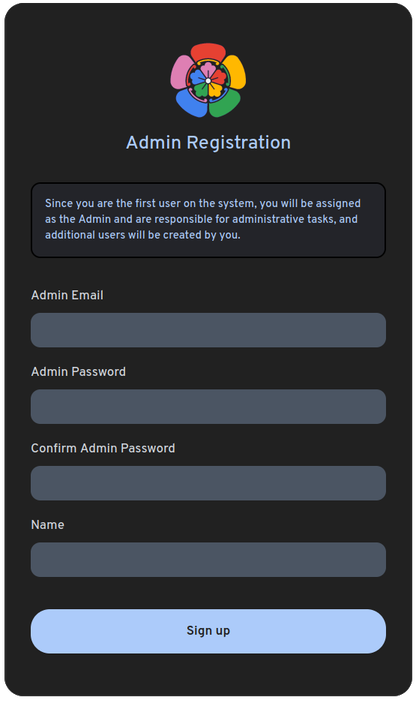
Register the Admin User
The first account created in the application automatically becomes the admin.
This admin account is responsible for creating and managing all other users.
To register the initial admin user, open the web interface at: https://immich.domain.fr
⬆️ Updating Immich
Immich deploys by push: ./deploy.ps1, run from the repository's clone on a dev machine,
pushes the commit — there is nothing to build there. The push fires the bare repo's hook, which calls
podmanctl --deploy immich <short-sha>: it acknowledges the push,
then deploys detached: a pull, a rebuild of the build/Dockerfile layer over the upstream image (a patch,
nothing compiles), a restart, and an nginx reload once nginx -t accepts a changed
nginx/ vhost. Every deploy ends with a receipt in the bare repo, refs/deploy/running or
refs/deploy/failed, which is how deploy.ps1 learns the outcome. Follow a deploy with
sudo tail -f /var/log/immich-deploy.log.
🚀 Deploying a change
From the repository's clone on a dev machine:
git add -u && git commit -m "..."
./deploy.ps1
It refuses a dirty tree, or a branch that has diverged from the server, before pushing anything.
After the push it waits until the receipt names the commit (-NoWait skips the wait): exit 0
once it runs, exit 4 when its deploy failed or is still queued, naming the log. With nothing left
to push it reads the receipt instead: the server runs HEAD → exit 3 (skipped); no receipt → exit 3
marked unconfirmed, with the reason; HEAD failed or never deployed → exit 4, naming the
podmanctl --deploy left to run there.
Every push restarts the stack — a commit that only touches
CLAUDE.mdincluded.
🪝 One-time setup — hook and clone wiring
The deploy entry point is central and installed once for the whole fleet —
see Podman — Push deploys for
podmanctl --deploy and its single sudoers rule. Only the two steps below
are per-repository.
# install into the bare repo's hooks/ — fires on every push
# ${SERVICE_NAME} expands now; the rest stays literal (\$…) for git to expand
sudo tee /media/ssd/git/podman/${SERVICE_NAME}.git/hooks/post-receive >/dev/null <<EOF
#!/bin/sh
set -eu
DEPLOY_BRANCH=refs/heads/master
while read -r oldrev newrev refname; do
  [ "\$refname" = "\$DEPLOY_BRANCH" ] || continue          # only the deploy branch
  sudo /usr/local/bin/podmanctl --deploy ${SERVICE_NAME} "\$(git rev-parse --short "\$newrev")" </dev/null
done
EOF
# normalize the hook ownership
sudo chown www-data:debian /media/ssd/git/podman/${SERVICE_NAME}.git/hooks/post-receive
sudo chmod 0750            /media/ssd/git/podman/${SERVICE_NAME}.git/hooks/post-receive

# git seeded hooks/ with executable *.sample files — inert, but strip the bit
sudo chmod -x /media/ssd/git/podman/${SERVICE_NAME}.git/hooks/*.sample
The commit comes from the just-pushed ref (the bare repo already holds it) and only names the deploy in its log. Nothing else is baked in:
podmanctlderives the service directory, user, admin group, env file and log path from the name it is given.
# deploys pull non-interactively as root: pull from the co-located bare repo over a
# LOCAL path (the HTTPS origin needs a credential prompt + TTY, which a hook lacks)
git -C ${SERVICE_DIR} remote set-url origin /media/ssd/git/podman/${SERVICE_NAME}.git

# trust both repos for root so the root-run `git pull` doesn't refuse with
# "detected dubious ownership"; --system applies whatever HOME the hook runs with
sudo git config --system --add safe.directory ${SERVICE_DIR}
sudo git config --system --add safe.directory /media/ssd/git/podman/${SERVICE_NAME}.git
Without the local origin the pull dies with could not read Username for 'https://…'; without
safe.directoryit dies with detected dubious ownership. Either way the worker aborts beforepodmanctl --updateand leaves the service running on its previous build.
🧱 Upgrading Immich
The images are pinned in gitignored env files, edited on the server — a push never moves
one: IMMICH_VERSION in immich.env, POSTGRES_VERSION in postgres.env, REDIS_VERSION in redis.env. Moving a pin is a deliberate step:
podmanctl --list --check            # UPDATE column shows when an upstream image moved
podmanctl --upgrade immich          # re-pull the images, rebuild, restart, prune the old ones
--updatenever re-pulls a tag it already holds, so a floating tag (latest,release) only moves with--upgrade; a bumped pin is pulled by either.Read Immich's release notes before moving
IMMICH_VERSION: its Postgres image (POSTGRES_VERSION) moves with it, and a new major Postgres cannot open the old data directory.