Proxy Server

A proxy-server allows us to:
- bypass censorship like firewalls
- encrypt and hide web traffic
- compress traffic to save bandwith and increase loading time
Info
The internet box needs to be configured to forward the ssh protocol to the ODROID-C4.
putty program will create a ssh tunnel to the device and firefox will be configured to use it.
Port forwarding
port-forwarding is an application of network address translation (NAT) that redirects a communication request from one address and port number combination to another. To be accessible from the network outside, the internet box should be connected to the ODROID-C4 via ethernet and configured to forward the ssh protocol using port-forwarding.
Avoid Using Port 22 for external SSH access
Port 22 is the default for SSH—and a common target for attacks.
Never expose it directly through port-forwarding.
Instead, choose an alternative port that: - Is not 22 - Is allowed by your network/firewall policies
Recommended options: 443, 1863
Activate Port-Forwarding
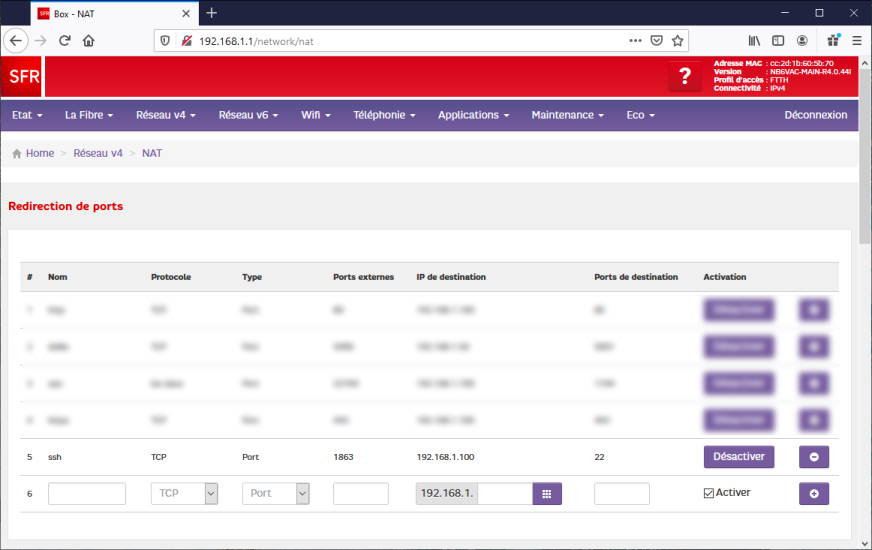
Login on your internet box on 192.168.1.1.
Enable port-forwarding from port 1863 to port 22 of the ODROID-C4 ipv4 address.
Note
At this step the ODROID-C4 should be accessible from the outside using ssh.
Create the tunnel
A ssh tunnel consists of an encrypted tunnel created through a ssh protocol connection.
It can be used to transfer unencrypted traffic over a network through an encrypted channel.
On Windows, a ssh tunnel will be created using the putty program.
Putty Configuration
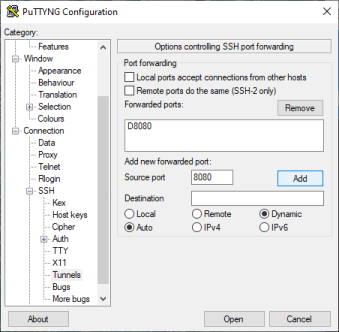
# Session
#   HostName:               <host>
#   Port:                   1863
#   Connection type:        SSH
# Connection
#   SSH
#       Enable compression  [x]
#       Tunnels
#           Source port:    8080
#           Dynamic         [x]
#           Auto            [x]
#           => click "Add" button
# => click "Open" button
Tip
Your ssh login/password will be asked and the tunnel will be created once connected.
Use the tunnel
For step-by-step instructions on setting up Firefox Portable with a proxy connection, see the Using Firefox Portable with a Proxy section. This guide explains how to download the portable edition, configure proxy settings, and securely route your browser traffic through an SSH tunnel.