🌐 Installing NGINX

 NGINX is a free, open-source, high-performance HTTP server and reverse proxy, as well as an IMAP/POP3 proxy server.
NGINX is known for its high performance, stability, rich feature set, simple configuration, and low resource consumption.
NGINX is a free, open-source, high-performance HTTP server and reverse proxy, as well as an IMAP/POP3 proxy server.
NGINX is known for its high performance, stability, rich feature set, simple configuration, and low resource consumption.
📥 Installation
📦 Install NGINX
NGINX is one of a handful of servers written to address the C10K problem. Unlike traditional servers, NGINX doesn't rely on threads to handle requests. Instead it uses a much more scalable event-driven (asynchronous) architecture. This architecture uses small, but more importantly, predictable amounts of memory under load. NGINX scales in all directions: from the smallest VPS all the way up to large clusters of servers.
# install NGINX
sudo apt-get install nginx

# check NGINX status
sudo nginx -t && sudo service nginx status
⚙️ Configure NGINX
Debian places NGINX configuration files in /etc/nginx and its sub-directories.
Shared configuration is kept directly in that root directory.
Specific server setups reside in the sites-available directory, with symlinks in the sites-enabled directory to make them active.
Define the NGINX html directory
Before proceeding, define the required variable:
DEFAULT_HTML_DIR: the absolute path to the directory where NGINX serves shared static content from (such as the default 404 page). The two error snippets below name it as theirroot: change both if you choose another directory.
# define the absolute path to the nginx html directory
DEFAULT_HTML_DIR=/media/ssd/html   # the root the two error snippets name
📁 Prepare the html directory
Create the html directory and grant www-data read access
# abort if DEFAULT_HTML_DIR is unset or empty
: "${DEFAULT_HTML_DIR:?is not set}"

# grant the NGINX worker user (www-data) read-only access to one html
# directory, existing + future content, and traverse-only on its parents
#   $1 = html directory served by NGINX (absolute path)
apply_acl_www() {
    local dir="$1"
    local parent

    # guard: refuse relative paths
    case "$dir" in /*) ;; *) echo "apply_acl_www: absolute path required: $dir" >&2; return 1;; esac

    # existing content (recursive, covers files AND dirs).
    # capital X grants execute only where it makes sense:
    #   dirs  -> r-x  (enter + list)
    #   files -> r--  (r-x only if the file is already executable)
    sudo setfacl -R -m u:www-data:rX "$dir"

    # existing content: drop all "other" permissions — www-data reads through
    # its named ACL entry; nobody else (service users, container subuids) can
    sudo chmod -R o-rwx "$dir"

    # future content: default ACL on every directory (only dirs can carry one).
    # Anything created inside later inherits www-data read access at creation;
    # new subdirs also inherit the default ACL itself, so the rule propagates.
    # o::- is pinned explicitly: without it the default ACL snapshots the
    # directory's current "other" bits and new files come out world-readable.
    sudo find "$dir" -type d -exec setfacl -d -m u:www-data:rX,o::- {} +

    # parents up to (not including) /: traverse-only (x) so www-data can pass
    # through the whole chain — no read, no listing.
    # / itself is world-traversable everywhere, no ACL needed there.
    parent=$(dirname "$dir")
    while [ "$parent" != "/" ]; do
        sudo setfacl -m u:www-data:x "$parent"
        parent=$(dirname "$parent")
    done
}

mkdir -p "${DEFAULT_HTML_DIR}"
apply_acl_www "${DEFAULT_HTML_DIR}"
📝 Install the configuration
Install /etc/nginx/nginx.conf
# install the main NGINX configuration
sudo tee /etc/nginx/nginx.conf > /dev/null <<'EOF'
user www-data;
worker_processes auto;
pid /run/nginx.pid;
include /etc/nginx/modules-enabled/*.conf;

events {
  worker_connections 1024;
}

http {
  ##
  # Core Settings
  ##
  sendfile on;
  tcp_nopush on;
  types_hash_max_size 2048;
  proxy_headers_hash_max_size 1024;
  proxy_headers_hash_bucket_size 128;
  client_max_body_size 10M;
  proxy_intercept_errors on;
  server_tokens off;

  ##
  # MIME types; default fallback
  ##
  include /etc/nginx/mime.types;
  default_type application/octet-stream;

  ##
  # WebSocket upgrade map. The empty branch is deliberately empty rather
  # than `close`: sites that proxy WebSockets and ordinary traffic through
  # the same location use this variable for both, and `close` would tell
  # every plain page load and API call to tear its upstream connection down,
  # defeating the `keepalive` pools their upstream{} blocks declare. An empty
  # value makes NGINX send no Connection header at all, which under HTTP/1.1
  # means keep-alive. A real handshake still gets `upgrade`.
  ##
  map $http_upgrade $connection_upgrade { default upgrade; '' ''; }

  ##
  # Rate-limit key: one bucket per client, shared by every site's limit_req
  # zone. IPv6 clients are keyed on their /64 prefix, not on a single
  # address: a home connection is delegated a whole /64, so keying on the
  # full address would hand one attacker 2^64 empty buckets and turn every
  # limiter into a no-op. $remote_addr is written by NGINX in canonical
  # form, so the client cannot pick which branch it matches.
  ##
  map $remote_addr $limit_key {
    "~^(?<prefix>[0-9a-f]+:[0-9a-f]+:[0-9a-f]+:[0-9a-f]+):" $prefix;  # IPv6, host part written out
    "~^(?<prefix>[0-9a-f:]+)::"                             $prefix;  # IPv6, host part compressed
    default                                                 $remote_addr;  # IPv4
  }

  ##
  # Per-client concurrency cap. limit_req bounds the request RATE; without
  # this nothing bounds how much one client holds open at once, and
  # worker_connections is 1024 for all fourteen sites together.
  #
  # Under HTTP/2 nginx counts each concurrent STREAM against limit_conn (every
  # stream carries its own request pool and holds a slot for its lifetime), so
  # this is a "requests in flight per client" cap, not a TCP-connection cap. A
  # browser opens up to ~100 streams on its single connection, and one
  # image-heavy page (a photo timeline, a poster wall, a cover grid) fires that
  # many requests at once — anything past the cap comes back 429 and the tiles
  # render blank, or a lazily imported JS chunk fails to load. 200 leaves room
  # for one such page plus a second device sharing the same IPv4 or IPv6 /64
  # key, and still bounds a single client hard.
  ##
  limit_conn_zone $limit_key zone=perip:10m;
  limit_conn perip 200;
  limit_conn_status 429;

  ##
  # The two catch-all servers (port 80 redirects to HTTPS, port 443 refuses a
  # name no site serves) live in conf.d/catch-all.conf, included below.
  ##

  ##
  # TLS/SSL Settings
  ##
  ssl_protocols TLSv1.2 TLSv1.3;
  # Forward-secret, AEAD-only. Without this line NGINX falls back to
  # HIGH:!aNULL:!MD5, which still offers plain-RSA key exchange (one day's
  # private-key compromise decrypts every past session) and CBC-SHA1.
  # TLS 1.3 negotiates its own suites and ignores this list.
  ssl_ciphers ECDHE-ECDSA-AES128-GCM-SHA256:ECDHE-RSA-AES128-GCM-SHA256:ECDHE-ECDSA-AES256-GCM-SHA384:ECDHE-RSA-AES256-GCM-SHA384:ECDHE-ECDSA-CHACHA20-POLY1305:ECDHE-RSA-CHACHA20-POLY1305;
  ssl_prefer_server_ciphers off;
  ssl_session_cache shared:SSL:10m;
  ssl_session_timeout 1d;
  ssl_session_tickets off;

  ##
  # Security Headers, inherited by every site that declares none of its own.
  # WARNING: add_header does NOT accumulate — a server{} or location{} block
  # that declares a single add_header replaces this whole set for that scope,
  # silently and without a warning from `nginx -t`. Any site adding one
  # header must restate all four.
  #
  # X-Frame-Options stays SAMEORIGIN rather than DENY: Calibre-Web's e-book
  # reader frames its own pages. Sites that never self-frame set DENY
  # themselves (all seven own projects do).
  ##
  add_header Strict-Transport-Security "max-age=63072000; includeSubDomains" always;
  add_header X-Content-Type-Options "nosniff" always;
  add_header X-Frame-Options "SAMEORIGIN" always;
  add_header Referrer-Policy "strict-origin-when-cross-origin" always;

  ##
  # Gzip Settings
  ##
  gzip on;
  gzip_comp_level 5;
  gzip_min_length 1400;
  gzip_vary on;
  gzip_proxied any;
  gzip_types
    application/atom+xml
    application/javascript
    application/json
    application/ld+json
    application/manifest+json
    application/wasm
    application/xhtml+xml
    application/xml
    image/svg+xml
    text/cache-manifest
    text/css
    text/plain
    text/vcard;

  ##
  # Logging Settings
  ##
  access_log /var/log/nginx/access.log;
  error_log /var/log/nginx/error.log;

  ##
  # Virtual Host Configs
  ##
  include /etc/nginx/conf.d/*.conf;
  include /etc/nginx/sites-enabled/*;
}
EOF
Install /etc/nginx/conf.d/catch-all.conf
# install the two catch-all servers: port 80 redirects to HTTPS, port 443 refuses a name no site serves
sudo tee /etc/nginx/conf.d/catch-all.conf > /dev/null <<'EOF'
##
# The catch-all servers, kept out of nginx.conf: a dev machine's run-local
# loads nginx.conf and one app's vhost without this file, and reaches that
# vhost on https://127.0.0.1 with no server name, which the 443 catch-all
# below would refuse.
##

##
# One catch-all HTTP server: redirect everything to HTTPS
##
server {
  listen 80 default_server;
  listen [::]:80 default_server;
  server_name _;
  return 308 https://$host$request_uri;
}

##
# One catch-all HTTPS server: no server_name matched, so refuse the TLS
# handshake outright. Without it NGINX falls back to whichever 443 block
# loaded first (alphabetically, from sites-enabled) and a forged Host
# header reaches that site's application. ssl_reject_handshake needs no
# certificate — NGINX never gets as far as presenting one.
##
server {
  listen 443 ssl default_server;
  listen [::]:443 ssl default_server;
  server_name _;
  ssl_reject_handshake on;
}
EOF
These install blocks show real files of this repository verbatim (
docs/files/nginx/; each include stops one line short of the file's end, where the heredoc'sEOFsupplies its last newline): a dev machine'srun-local.ps1serves each app through the same NGINX configuration, every file butconf.d/catch-all.conf: a local client reaches the app's vhost onhttps://127.0.0.1with no server name, which the 443 catch-all would refuse. Installnginx.confandcatch-all.conftogether, then runsudo nginx -tonce: either file alone leaves NGINX with no catch-all or with two.docs/files/nginx/proxy_paramsis Debian's own/etc/nginx/proxy_paramsas the server has it, kept for reference only: never install it.
Fix the MIME type for .webmanifest files
# fix mime type for .webmanifest files
sudo tee /etc/nginx/conf.d/webmanifest-mime.conf > /dev/null <<'EOF'
types {
  application/manifest+json webmanifest;
}
EOF
🚫 Install the 404 page
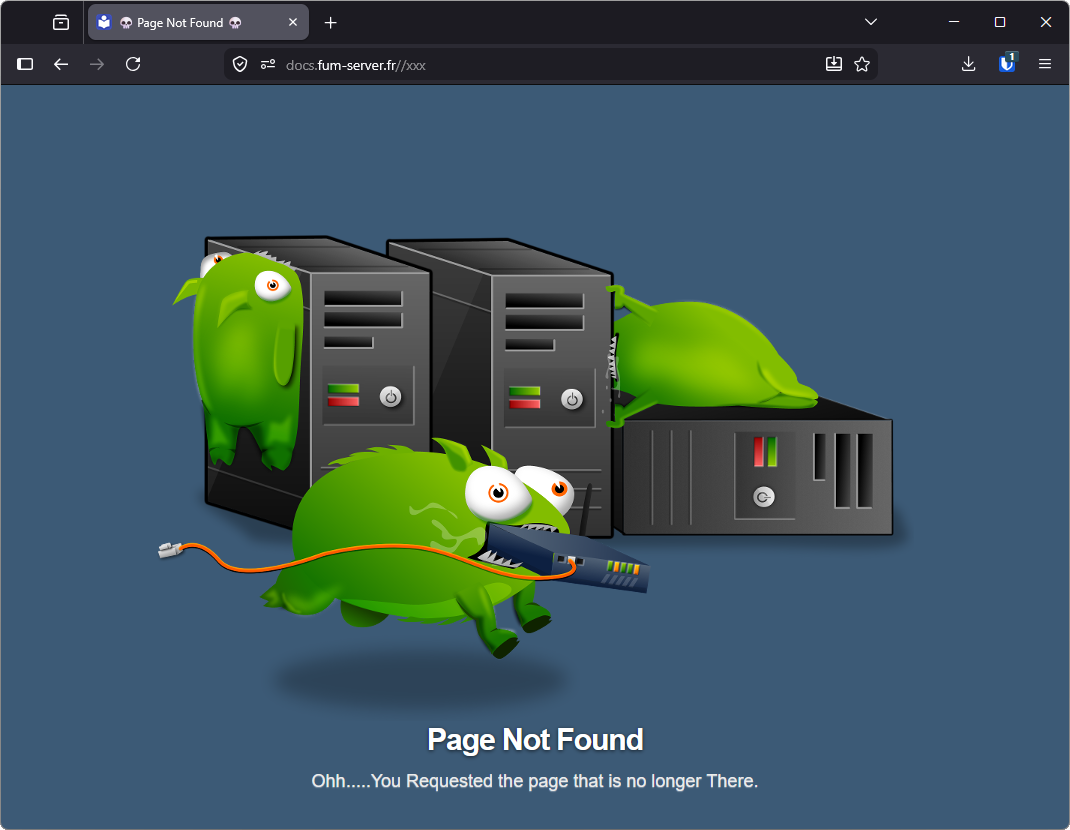
The custom default 404 webpage is available here: download.
The error-404.conf snippet only declares a shared, internal location for /404.html:
a virtual host activates it by including the snippet and declaring error_page 404 /404.html; in its server block.
Install the 404.html file
# abort if DEFAULT_HTML_DIR is unset or empty, warn if it is not a directory
: "${DEFAULT_HTML_DIR:?is not set}"
[ -d "${DEFAULT_HTML_DIR}" ] || echo "Error: DEFAULT_HTML_DIR is not a directory" >&2

# download the default 404 webpage
wget https://docs.fum-server.fr/files/404.html -O "${DEFAULT_HTML_DIR}/404.html"
Create the error-404.conf snippet
# create the shared 404 location snippet (its root is the html directory above)
sudo tee /etc/nginx/snippets/error-404.conf > /dev/null <<'EOF'
##
# Common 404 page for all servers
##
location = /404.html {
  root /media/ssd/html;
  internal;
}
EOF
🚧 Install the Maintenance page
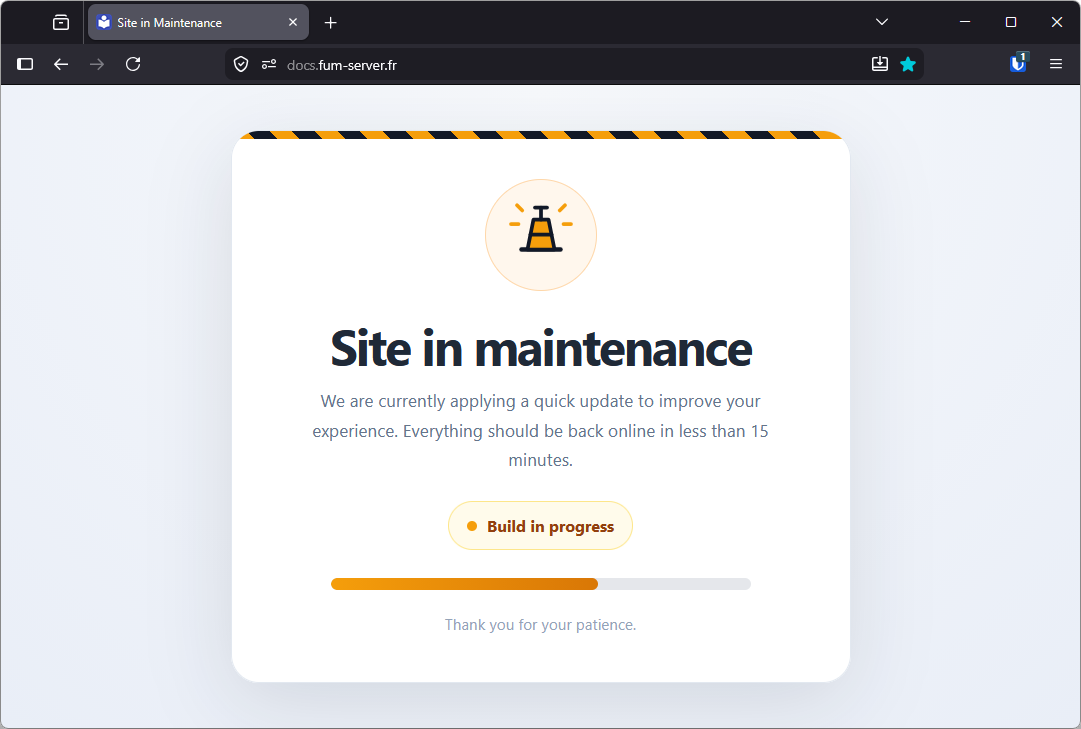
The custom maintenance webpage is available here: download.
The error-maintenance.conf snippet only declares a shared, internal location for /maintenance.html:
a virtual host activates it by including the snippet and declaring error_page 502 503 504 /maintenance.html; in its server block.
Install the maintenance.html file
# abort if DEFAULT_HTML_DIR is unset or empty, warn if it is not a directory
: "${DEFAULT_HTML_DIR:?is not set}"
[ -d "${DEFAULT_HTML_DIR}" ] || echo "Error: DEFAULT_HTML_DIR is not a directory" >&2

# download the maintenance webpage
wget https://docs.fum-server.fr/files/maintenance.html -O "${DEFAULT_HTML_DIR}/maintenance.html"
Create the error-maintenance.conf snippet
# create the shared maintenance location snippet (its root is the html directory above)
sudo tee /etc/nginx/snippets/error-maintenance.conf > /dev/null <<'EOF'
##
# Common maintenance page for all servers
##
location = /maintenance.html {
  root /media/ssd/html;
  internal;
}
EOF
🔄 Restart NGINX
# restart NGINX service
sudo nginx -t && sudo service nginx restart