🐳 Installing n8n
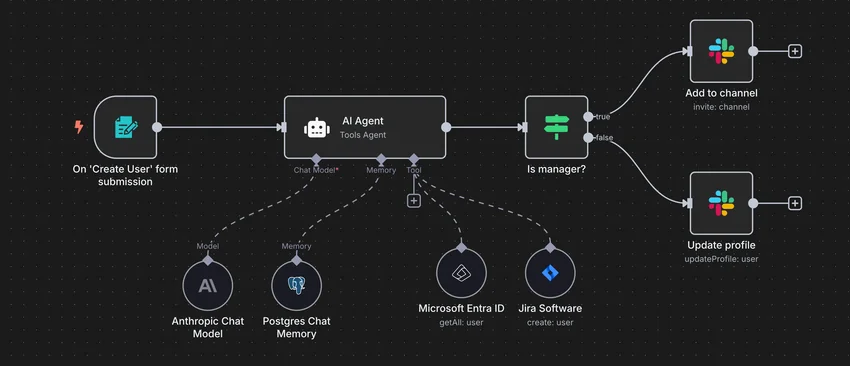
n8n is an open-source automation platform that lets you connect apps and APIs to create workflows with little or no code. This documentation covers how to install, configure, and operate n8n in a self-hosted setup, along with practical tips and examples to help you build reliable automations quickly.
Info
The project is open-source and can be downloaded here: https://github.com/n8n-io/n8n.
📥 Installation
This section describes how to install and run Podman services using systemd Quadlet, enabling containers to restart automatically. It allows the service to run in its own isolated rootless environment with a dedicated Linux user.
📋 Requirements
⚙️ Configuration
📋 Service Setup
Info
Please follow the following installation steps:
Define Service Variables
# define the service name
SERVICE_NAME=n8n
Initialize Service Environment
# built-in bash safety and SERVICE_NAME validation
set -euo pipefail; [ -n "${SERVICE_NAME:-}" ] || { echo "SERVICE_NAME is empty"; exit 1; }

# automatically generate variables
SERVICE_HOME="/media/ssd/podman-users/${SERVICE_NAME}"
SERVICE_DIR="/media/ssd/podman/${SERVICE_NAME}"
SERVICE_USER="${SERVICE_NAME}_svc"
SERVICE_ADMIN="${SERVICE_NAME}_admins"
🔐 Service Isolation
Configure Rootless Podman UID/GID Namespace Mappings
# allocate rootless Podman UID/GID mappings if missing
SUBID_SIZE=65536
allocate_subids_if_missing() {
  local user="$1"
  local start
  if ! grep -q "^${user}:" /etc/subuid; then
    start="$(awk -F: 'BEGIN { max = 100000 } { end = $2 + $3; if (end > max) max = end } END { print max }' /etc/subuid)"
    sudo usermod --add-subuids "${start}-$((start + SUBID_SIZE - 1))" "$user"
  fi
  if ! grep -q "^${user}:" /etc/subgid; then
    start="$(awk -F: 'BEGIN { max = 100000 } { end = $2 + $3; if (end > max) max = end } END { print max }' /etc/subgid)"
    sudo usermod --add-subgids "${start}-$((start + SUBID_SIZE - 1))" "$user"
  fi
}
allocate_subids_if_missing "${SERVICE_USER}"

# verify rootless Podman UID/GID namespace mappings exist
grep -q "^${SERVICE_USER}:" /etc/subuid || { echo "ERROR: missing subuid mappings for ${SERVICE_USER}"; exit 1; }
grep -q "^${SERVICE_USER}:" /etc/subgid || { echo "ERROR: missing subgid mappings for ${SERVICE_USER}"; exit 1; }

# validate that all subordinate ID ranges in a file are non-overlapping
validate_subid_ranges() {
  local file="$1"
  awk -F: '
    {
      start = $2
      end   = $2 + $3 - 1
      for (i = 1; i <= count; i++) {
        if (start <= ends[i] && end >= starts[i]) {
          printf "ERROR: overlapping ranges in %s\n", FILENAME
          printf "  %s:%s:%s overlaps %s:%s:%s\n",
            $1, $2, $3,
            names[i], starts[i], sizes[i]
          exit 1
        }
      }
      count++
      names[count]  = $1
      starts[count] = start
      ends[count]   = end
      sizes[count]  = $3
    }
  ' "$file"
}
validate_subid_ranges /etc/subuid
validate_subid_ranges /etc/subgid

# configure the rootless storage driver BEFORE Podman first initializes its storage.
# fuse-overlayfs is a reliable rootless overlay backend and avoids kernel-version
# quirks of native rootless overlay on ARM/Armbian. It is optional with the default
# userns used here, but recommended; set it before the first storage init so no
# 'podman system reset' is needed later.
sudo -u "${SERVICE_USER}" mkdir -p "${SERVICE_HOME}/.config/containers"
sudo -u "${SERVICE_USER}" tee "${SERVICE_HOME}/.config/containers/storage.conf" >/dev/null <<'EOF'
[storage]
driver = "overlay"

[storage.options.overlay]
mount_program = "/usr/bin/fuse-overlayfs"
EOF

# rebuild rootless Podman state to ensure existing containers/storage use current namespace mappings
# use a login shell (-i) so HOME points at the service user's home
# (storage now initializes with fuse-overlayfs; no 'podman system reset' needed)
sudo -iu "${SERVICE_USER}" podman system migrate
Configure Secure Service Directory Permissions
# Apply the admin/service ACL policy to one directory tree, deterministically.
#   $1 = tree to treat
#   $2 = (optional) a sub-path to skip entirely (e.g. a container data subtree)
#
# Why setfacl, not chmod: on an ACL'd tree, chmod edits only the mask, never group::,
# so stale execute bits survive. setfacl sets every entry explicitly (mask included),
# lowercase — the result is reproducible and no execute bit can resurface.
apply_acl_tree() {
    local tree="$1"
    local skip="${2:-}"
    local prune=()
    [ -n "$skip" ] && prune=( -path "$skip" -prune -o )                                         # skip this subtree if a 2nd arg is given

    sudo find "$tree" "${prune[@]}" -exec chown "${SERVICE_USER}:${SERVICE_ADMIN}" {} +         # service user owns; admin group is the owning group

    # directories — access ACL (perms on the existing dirs)
    sudo find "$tree" "${prune[@]}" -type d -exec setfacl    -m g:${SERVICE_ADMIN}:rwx {} +     # admin group: access existing dirs
    sudo find "$tree" "${prune[@]}" -type d -exec setfacl    -m u:${SERVICE_USER}:rwx {} +      # service user: access existing dirs
    sudo find "$tree" "${prune[@]}" -type d -exec setfacl    -m u::rwx,g::rwx,o::-,m::rwx {} +  # owner/group rwx, deny others, pin mask rwx

    # directories — default ACL (inherited by NEW files/dirs created later)
    sudo find "$tree" "${prune[@]}" -type d -exec setfacl -d -m g:${SERVICE_ADMIN}:rwx {} +     # admin group: inherit access on new items
    sudo find "$tree" "${prune[@]}" -type d -exec setfacl -d -m u:${SERVICE_USER}:rwx {} +      # service user: inherit access on new items
    sudo find "$tree" "${prune[@]}" -type d -exec setfacl -d -m u::rwx,g::rwx,o::- {} +         # default owner/group/other for new items

    # files — access ACL (rw only, never executable)
    sudo find "$tree" "${prune[@]}" -type f -exec setfacl    -m g:${SERVICE_ADMIN}:rw {} +      # admin group: access existing files
    sudo find "$tree" "${prune[@]}" -type f -exec setfacl    -m u:${SERVICE_USER}:rw {} +       # service user: access existing files
    sudo find "$tree" "${prune[@]}" -type f -exec setfacl    -m u::rw,g::rw,o::-,m::rw {} +     # owner/group rw, deny others, pin mask rw

    sudo find "$tree" "${prune[@]}" -type d -exec chmod g+s {} +                                # setgid: new items inherit the group (a MODE bit; ACLs can't set it)
}

# --- SERVICE_HOME: Podman's private runtime home ------------------------------
# Own the home + set setgid, then ACL ONLY the .config subtree (containers.conf,
# storage.conf, and the *.network / *.container quadlets you hand-edit) so admins
# can edit them sudo-less.
#
# Leave ~/.local (storage) and ~/.cache to Podman: ACLs on the overlay store break
# the runtime ("OCI permission denied" on the `merged` mount). Admin reaches them via sudo.
sudo chown "${SERVICE_USER}:${SERVICE_ADMIN}" "${SERVICE_HOME}"                       # service user owns; admin group is the owning group
sudo chmod u=rwx,g=rwx,o=,g+s "${SERVICE_HOME}"                                       # owner/admin access; deny others; inherit group on new items
apply_acl_tree "${SERVICE_HOME}/.config"                                              # .config subtree: full sudo-less admin ACL treatment

# --- bind-mount data dirs: created + owned BEFORE the SERVICE_DIR ACL pass ---------
# Each container writes as a mapped subuid, so its data dir must be owned by that subuid
# (chown as root; only root crosses the id range). We create + own them FIRST so they
# neither inherit SERVICE_DIR's default ACL (inheritance happens at creation) nor get
# walked by apply_acl_tree (which prunes data/).
#
# No ACLs here: Postgres refuses a group-accessible PGDATA. Admin reaches them via sudo;
# back Postgres up with pg_dumpall, not a raw file copy.
SUBUID_BASE="$(awk -F: -v u="${SERVICE_USER}" '$1==u {print $2}' /etc/subuid)"
SUBGID_BASE="$(awk -F: -v u="${SERVICE_USER}" '$1==u {print $2}' /etc/subgid)"

# data subdir : in-container uid/gid it must be owned by
data_dirs=(
    "postgres-db:70"        # /var/lib/postgresql/data — alpine postgres user (70)
    "n8n:1000"              # /home/node/.n8n — n8nio/n8n image declares USER node (1000)
)

mkdir -p "${SERVICE_DIR}/data"                                                        # the data/ parent: plain, no ACL
sudo chown "${SERVICE_USER}:${SERVICE_ADMIN}" "${SERVICE_DIR}/data"                   # owner/admin
sudo chmod 0750 "${SERVICE_DIR}/data"                                                 # children are set individually below
for entry in "${data_dirs[@]}"; do
    sub="${entry%%:*}"                                  # subdir name
    ids="${entry#*:}"                                   # "uid" or "uid:gid"
    uid="${ids%%:*}"                                    # uid
    gid="${ids#*:}"; [ "$gid" = "$ids" ] && gid="$uid"  # gid (defaults to uid)
    dir="${SERVICE_DIR}/data/${sub}"
    sudo mkdir -p "$dir"
    sudo chown -R "$((SUBUID_BASE + uid - 1)):$((SUBGID_BASE + gid - 1))" "$dir"   # map both to host subids
    sudo chmod 0700 "$dir"
done

# --- SERVICE_DIR: application data, env files, configuration -------------------
# Full treatment so the admin group gets sudo-less access AND the service user keeps
# access even on admin-created files. data/ is EXCLUDED: those dirs are owned by the
# containers' subuids and need engine-specific modes (Postgres rejects a group/other-
# accessible PGDATA), so they are handled separately just below.
apply_acl_tree "${SERVICE_DIR}" "${SERVICE_DIR}/data"                                 # treat everything EXCEPT data/
Configure Secure NGINX Static Assets Permissions
# Grant the NGINX worker user (www-data) read-only access to assets subtrees.
#   $1     = service directory → traverse-only (x)
#   $2..$n = assets subtrees served directly by NGINX (configs, icons, favicon, manifest, ...)
apply_acl_nginx() {
    local tree="$1"; shift
    local assets

    sudo setfacl -m u:www-data:x "$tree"                                        # traverse only: pass through, no listing, no reading

    for assets in "$@"; do
        # assets directories — enter + list, existing and future
        sudo find "$assets" -type d -exec setfacl    -m u:www-data:rx {} +      # www-data: read existing dirs
        sudo find "$assets" -type d -exec setfacl -d -m u:www-data:rx {} +      # www-data: inherit read on new items

        # assets files — www-data read-only, owner/admin rw, never executable.
        # Entries AND mask are pinned explicitly: a bare `setfacl -m u:www-data:r`
        # would recalculate the mask to the union of all entries, resurfacing the
        # latent rwx inherited from the default ACL (files would show group rwx).
        sudo find "$assets" -type f -exec setfacl \
          -m u:www-data:r,u:${SERVICE_USER}:rw,g:${SERVICE_ADMIN}:rw,u::rw,g::rw,o::-,m::rw {} +
    done
}

# --- SERVICE_DIR/nginx: served directly by NGINX -------------------------------
# Created AFTER the apply_acl_tree pass so it inherits the default ACL + setgid
# group (service user/admin keep full access); www-data is then layered on top
# as a read-only named entry. (n8n serves no static assets, so no icons/ dir.)
sudo mkdir -p "${SERVICE_DIR}/nginx"
sudo chown "${SERVICE_USER}:${SERVICE_ADMIN}" "${SERVICE_DIR}/nginx"
apply_acl_nginx "${SERVICE_DIR}" "${SERVICE_DIR}/nginx"
🛡️ Rootless Podman Defaults
Configure rootless Podman per-user configuration directory
# configure rootless Podman defaults for this service user
# - store per-user Podman configuration under ~/.config/containers
sudo -u "${SERVICE_USER}" mkdir -p "${SERVICE_HOME}/.config/containers/systemd"
Configure rootless Podman defaults
# configure rootless Podman defaults for this service user
# - use k8s-file logging for easier log rotation and inspection
sudo -u "${SERVICE_USER}" tee "${SERVICE_HOME}/.config/containers/containers.conf" >/dev/null <<EOF
[containers]
log_driver = "k8s-file"

[engine]
healthcheck_events=false
EOF
🔧 Service Configuration
Setup n8n Parameters
Before deploying, you need to define a few environment variables that will be used throughout the setup process.
BASE_URL: public URL where the web service is accessibleHOST_PORT: external port used by NGINX to route traffic to the serviceSMTP_USER: username for authenticating with the SMTP serverSMTP_PWD: password or app-specific token for SMTP authentication
###################################################################################
# NGINX Proxy Configuration
###################################################################################
HOST_PORT=10040
###################################################################################
# Postgres Configuration
###################################################################################
PG_DB=n8n
PG_USER=n8n
PG_PASSWORD="$(openssl rand -hex 32)"
###################################################################################
# n8n Configuration
###################################################################################
BASE_URL=https://n8n.domain.fr
SMTP_USER="user@gmail.com"
SMTP_PWD="baoi lvyi cgev wzzq"

N8N_ENCRYPTION_KEY="$(openssl rand -hex 32)"
Getting Your Gmail SMTP Password
To send emails via Gmail SMTP, you'll need to generate an App Password.
A special password used for third-party applications.
Visit myaccount.google.com/apppasswords to create one.
Use the generated password in the SMTP_PWD field of your configuration.
Create Environment files
sudo -u "${SERVICE_USER}" tee "${SERVICE_DIR}/postgres.env" >/dev/null <<EOF
###################################################################################
# Postgres Database Configuration
###################################################################################
POSTGRES_VERSION=16-alpine
POSTGRES_DB=${PG_DB}
POSTGRES_USER=${PG_USER}
POSTGRES_PASSWORD=${PG_PASSWORD}
EOF
sudo -u "${SERVICE_USER}" tee "${SERVICE_DIR}/n8n.env" >/dev/null <<EOF
###################################################################################
# NGINX Proxy Configuration
###################################################################################
HOST_PORT=${HOST_PORT}

###################################################################################
# n8n URL Configuration
###################################################################################
N8N_EDITOR_BASE_URL=${BASE_URL}
WEBHOOK_URL=${BASE_URL}/webhook

###################################################################################
# n8n Generic Configuration
###################################################################################
N8N_VERSION=latest
N8N_ENCRYPTION_KEY=${N8N_ENCRYPTION_KEY}
GENERIC_TIMEZONE=Europe/Paris

###################################################################################
# n8n Email Configuration (for SMTP)
###################################################################################
N8N_EMAIL_MODE=smtp
N8N_SMTP_HOST=smtp.gmail.com
N8N_SMTP_PORT=465
N8N_SMTP_USER=${SMTP_USER}
N8N_SMTP_PASS=${SMTP_PWD}
N8N_SMTP_SSL=true
N8N_SMTP_STARTTLS=false
EOF
Keep the .env files
All the secret informations will be stored in the .env files.
🧩 Quadlet Service
Create Network Podman Quadlet
# podman quadlet: create network
sudo -u "${SERVICE_USER}" tee "${SERVICE_HOME}/.config/containers/systemd/n8n.network" >/dev/null <<EOF
[Network]
NetworkName=n8n
EOF
Create Postgres Podman Quadlet
# podman quadlet: create PostgreSQL
sudo -u "${SERVICE_USER}" tee "${SERVICE_HOME}/.config/containers/systemd/n8n-postgres.container" >/dev/null <<'EOF'
[Unit]
Description=n8n PostgreSQL database
# give up after 6 failed starts within 30 min (podmanctl --restart clears it)
StartLimitIntervalSec=1800
StartLimitBurst=6

[Container]
EnvironmentFile=/media/ssd/podman/n8n/postgres.env
Image=docker.io/library/postgres:${POSTGRES_VERSION}
ContainerName=n8n-postgres
Network=n8n.network

# run as the postgres uid/gid (alpine = 70). The image starts its entrypoint as root
# then drops to 70 before creating PGDATA, so we pin the uid here. The data dir is
# pre-chowned to 70's mapped subuid in the permissions step, so a plain :rw mount works.
User=70:70

Environment=PGDATA=/var/lib/postgresql/data/pgdata

# plain bind mount (data dir already owned by 70's subuid). Host data is owned by that
# subuid; the debian admin still reaches it via the SERVICE_DIR ACLs / sudo.
Volume=/media/ssd/podman/n8n/data/postgres-db:/var/lib/postgresql/data:rw

HealthCmd=pg_isready -U $POSTGRES_USER -d $POSTGRES_DB
HealthStartPeriod=30s
HealthInterval=60s
HealthTimeout=5s
HealthRetries=3
HealthOnFailure=kill

[Service]
EnvironmentFile=/media/ssd/podman/n8n/postgres.env
UMask=0007

Restart=on-failure
RestartSec=10
RestartSteps=5
RestartMaxDelaySec=300
TimeoutStartSec=180

[Install]
WantedBy=default.target
EOF
UMask=0007should be configured for each Podman Quadlet service. It removes all permissions forotherswhile preserving read/write access for the service owner and admin group on newly created files and directories.
Create N8N Server Podman Quadlet
# podman quadlet: create n8n server
sudo -u "${SERVICE_USER}" tee "${SERVICE_HOME}/.config/containers/systemd/n8n-server.container" >/dev/null <<'EOF'
[Unit]
Description=n8n server
Requires=n8n-postgres.service
After=n8n-postgres.service
# give up after 6 failed starts within 30 min (podmanctl --restart clears it)
StartLimitIntervalSec=1800
StartLimitBurst=6

[Container]
EnvironmentFile=/media/ssd/podman/n8n/n8n.env
Image=docker.io/n8nio/n8n:${N8N_VERSION}
ContainerName=n8n-server
Network=n8n.network

# No User= needed: the n8n image already declares USER node (1000). The data dir is
# pre-chowned to node's mapped subuid in the permissions step, so a plain :rw mount works.

Environment=DB_TYPE=postgresdb
Environment=DB_POSTGRESDB_HOST=n8n-postgres
Environment=DB_POSTGRESDB_DATABASE=${POSTGRES_DB}
Environment=DB_POSTGRESDB_USER=${POSTGRES_USER}
Environment=DB_POSTGRESDB_PASSWORD=${POSTGRES_PASSWORD}
Environment=N8N_TRUST_PROXY=true
Environment=N8N_PROXY_HOPS=1
Environment=N8N_PUBLIC_API_DISABLED=true
Environment=N8N_PUBLIC_API_SWAGGERUI_DISABLED=true
Environment=N8N_HIRING_BANNER_ENABLED=false
Environment=N8N_TEMPLATES_ENABLED=true
Environment=N8N_RUNNERS_ENABLED=true
Environment=N8N_ENFORCE_SETTINGS_FILE_PERMISSIONS=true

# plain bind mount (data dir already owned by node's subuid via the permissions step)
Volume=/media/ssd/podman/n8n/data/n8n:/home/node/.n8n:rw

PublishPort=127.0.0.1:${HOST_PORT}:5678

HealthCmd=wget --spider -q http://127.0.0.1:5678/healthz
HealthStartPeriod=180s
HealthInterval=60s
HealthTimeout=3s
HealthRetries=3
HealthOnFailure=kill

[Service]
EnvironmentFile=/media/ssd/podman/n8n/n8n.env
EnvironmentFile=/media/ssd/podman/n8n/postgres.env
UMask=0007
SuccessExitStatus=143

Restart=on-failure
RestartSec=10
RestartSteps=5
RestartMaxDelaySec=300
TimeoutStartSec=600
# wait until Postgres reports healthy before starting n8n
ExecStartPre=/bin/sh -c 'until podman healthcheck run n8n-postgres >/dev/null 2>&1; do sleep 5; done'

[Install]
WantedBy=default.target
EOF
UMask=0007: removes all permissions forotherswhile preserving read/write access for the service owner and admin group on newly created files and directoriesSuccessExitStatus=143: treat a SIGTERM-style exit (143) as a clean stop, not a failureRestart=on-failure+StartLimit*: retry a failed start with exponential backoff (10 s → 5 min) and give up after 6 failed starts within 30 min —podmanctl --restartclears the limit
▶️ Start n8n
Enable and Start Quadlet Services
# open an interactive shell as the service user
sudo -iu "${SERVICE_USER}"

# reload systemd user units
systemctl --user daemon-reload

# start Podman Quadlet services
systemctl --user start n8n-server.service

# verify service status
systemctl --user status n8n-server.service
To follow the service logs in real time, run
sudo journalctl _UID=$(id -u ${SERVICE_USER}) -ffrom the Debian account.
🚀 Deploy n8n
Install NGINX
NGINX needs to be installed, follow the NGINX section.
Configure NGINX
NGINX needs to be configured using a file in /etc/nginx/sites-enabled directory.
This configuration file specify the documentation path:
# Per-client rate-limit bucket for the login endpoint. Must live in http{}
# context, so it sits outside the server{} block. $limit_key is the shared key
# from nginx.conf: the address for IPv4, the /64 prefix for IPv6 — keying on a
# full IPv6 address would let one subscriber prefix mint 2^64 empty buckets and
# bypass the limit entirely.
limit_req_zone $limit_key zone=n8n_auth:10m rate=10r/m;

# The app container, published on the loopback by its Quadlet unit. It sits
# behind an upstream block for one reason: `keepalive`. Without it nginx opens —
# and immediately closes — a brand-new TCP connection for EVERY proxied request,
# and on this host each of those crosses rootless Podman's userspace port
# forwarder. Opening the node panel fetches an icon per node on top of
# the editor bundle, each of which paid its own handshake through that
# forwarder.
# `proxy_http_version 1.1` (already set in every location) and an empty
# `Connection` header are what let a connection go back into this pool instead
# of being torn down.
# Node, which n8n runs on, closes an idle connection after about 5 s of its
# own accord, so this pool is retired at 4 s: a socket nginx still believes
# is open but the app has just closed answers the request that races it with
# a 502. Four seconds is far longer than a page load, which is where the
# whole benefit sits.
upstream n8n_app {
  server 127.0.0.1:10040;
  keepalive 32;
  keepalive_requests 1000;
  keepalive_timeout 4s;
}

server {
  server_name n8n.domain.fr;

  # The security header quartet (HSTS, nosniff, X-Frame-Options, Referrer-Policy)
  # is inherited from the http{} block in nginx.conf — this file declares none.
  # WARNING: add_header does NOT accumulate. A single add_header added here, or
  # in any location{} below, replaces that whole inherited set for that scope —
  # silently, with no warning from `nginx -t`. If one is ever needed, restate all
  # four alongside it.

  # setup 404 error_page
  error_page 404 /404.html;
  include snippets/error-404.conf;

  # show maintenance page when backend is down
  error_page 502 503 504 /maintenance.html;
  include snippets/error-maintenance.conf;

  # n8n's owner account signs in here, and that account holds every workflow
  # credential — so this is the route a password guesser would hammer.
  # Rate-limited before the app spends any work on it; rejections give 429.
  # Exact match, so it wins over `location /`.
  location = /rest/login {
    limit_req zone=n8n_auth burst=5 nodelay;
    limit_req_status 429;

    proxy_pass http://n8n_app;
    proxy_http_version 1.1;
    include proxy_params;
    # Empty Connection header: keeps the pooled upstream connection alive.
    proxy_set_header Connection "";
    proxy_set_header X-Forwarded-For $remote_addr;
    proxy_set_header X-Forwarded-Host $host;
    proxy_set_header X-Forwarded-Port $server_port;
  }

  # reverse proxy
  location / {
    proxy_pass http://n8n_app;

    # keep it HTTP/1.1
    proxy_http_version 1.1;

    # websocket support (required for real-time notifications). $connection_upgrade
    # is the map declared in nginx.conf: "upgrade" on a real handshake, "" on every
    # other request. Hardcoding "upgrade" would send a hop-by-hop upgrade header on
    # plain page loads and API calls too, and defeat keepalive to the upstream.
    # That "" branch is load-bearing here: it is what lets an ordinary request
    # return its connection to the pool declared above.
    proxy_set_header Upgrade $http_upgrade;
    proxy_set_header Connection $connection_upgrade;

    # forwarded headers. proxy_params APPENDS to the client's own
    # X-Forwarded-For, so a caller can prepend whatever hops it likes; NGINX is
    # the edge here and there is no upstream chain worth keeping, so overwrite
    # it with the real peer and the app can never be handed a forged hop.
    include proxy_params;
    proxy_set_header X-Forwarded-For $remote_addr;
    proxy_set_header X-Forwarded-Host $host;
    proxy_set_header X-Forwarded-Port $server_port;

    # application-specific tuning
    proxy_read_timeout 600s;
    proxy_send_timeout 600s;
    client_max_body_size 100M;

    # Stream the body straight to the app instead of spooling it to the proxy's
    # disk first. With request buffering on (the default), NGINX reads the WHOLE
    # body into client_body_temp before it opens the upstream connection — so an
    # unauthenticated POST to any path here could write 100 MB to the SSD long
    # before n8n ever got the chance to refuse it.
    proxy_request_buffering off;

    proxy_buffering off;
    proxy_redirect off;
  }
}
# restart nginx
sudo nginx -t && sudo service nginx restart
Replace
n8n.domain.frby the name of your website.
Activate HTTPS
To activate HTTPS protocol, follow the Let's Encrypt section.
⚙️ Configure n8n
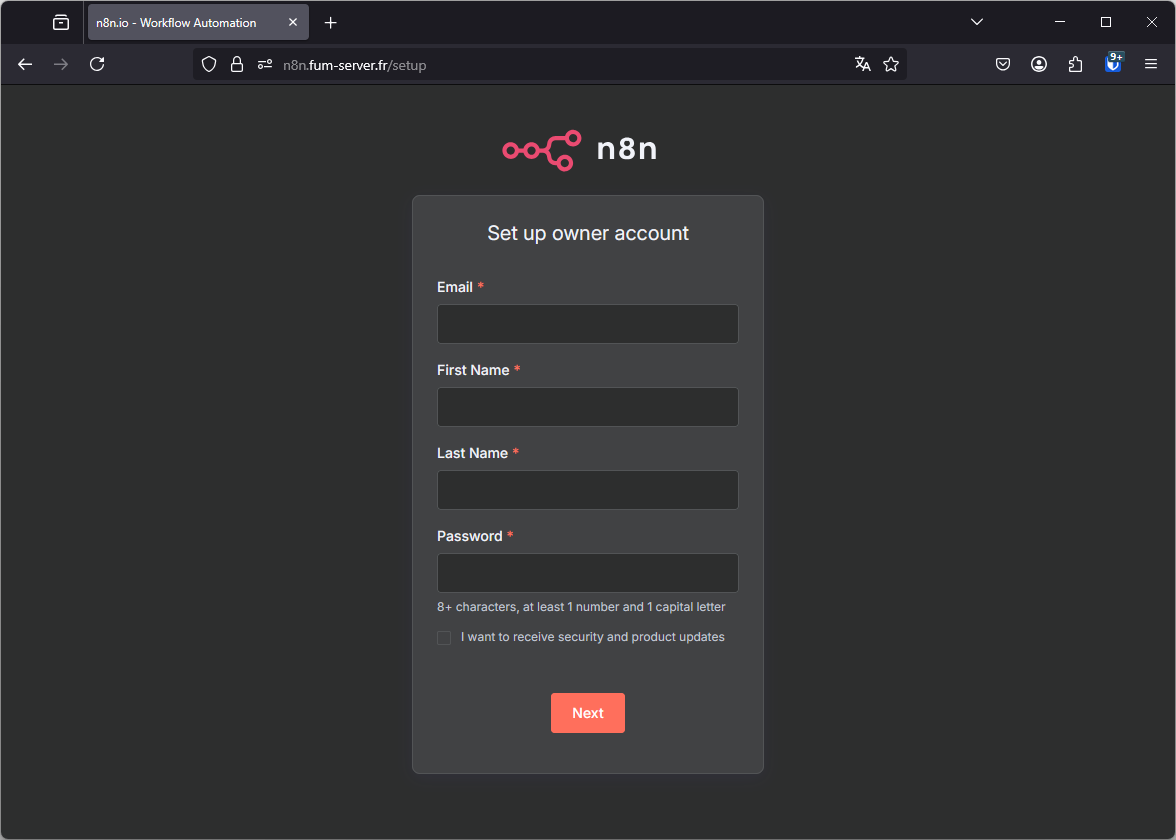
Setup the n8n admin account immediately
The default installation exposes an unsecured admin interface.
To protect your workflows and credentials, you must create the admin account right after launching n8n.